
¿Por qué? Bueno... ¿por qué no?
Esto lo escribí por primera vez para Cocoa and the Time Machine. Quería un cañón que disparara balas de cañón que siguieran diferentes trayectorias... y rebotaran al tocar el suelo, perdiendo impulso poco a poco.
Aquí tienes uno en acción.
Puede parecer que hay matemáticas complicadas, pero no te asustes: es bastante sencillo y se basa sobre todo en aprovechar el comando JUMP de MPAGD.
Podríamos pensar que JUMP solo sirve para el jugador, pero MPAGD te permite hacer que cualquier sprite use JUMP. También admite un parámetro que controla la altura que puede saltar el sprite.
Así que, en la práctica, nuestra bala de cañón simplemente hace una serie de saltos cada vez más pequeños.
Primero vamos a necesitar un par de sprites, uno para el cañón y otro para la bala de cañón (o elige la artillería que prefieras).
Para el cañón voy a crear dos fotogramas, uno mirando a la izquierda y otro a la derecha. Según dónde coloque el cañón en una pantalla, quiero que apunte en la dirección correcta (necesitamos algo de espacio para trabajar, así que lo normal es que los cañones estén cerca del borde derecho o del izquierdo).
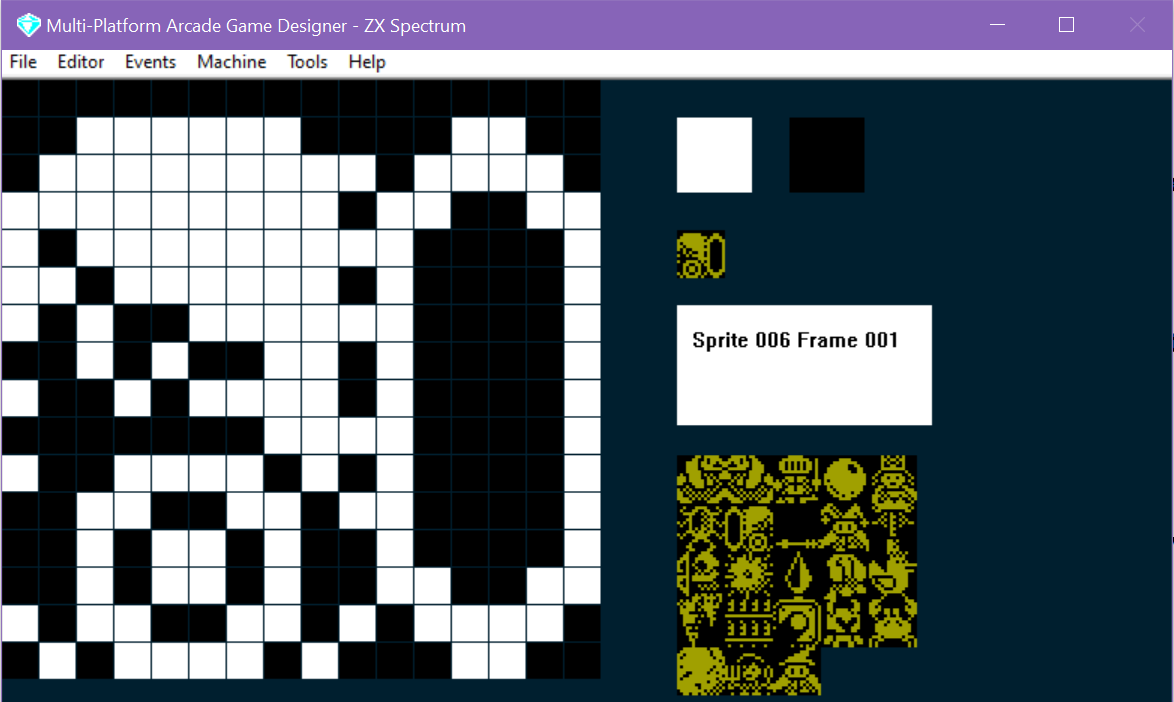
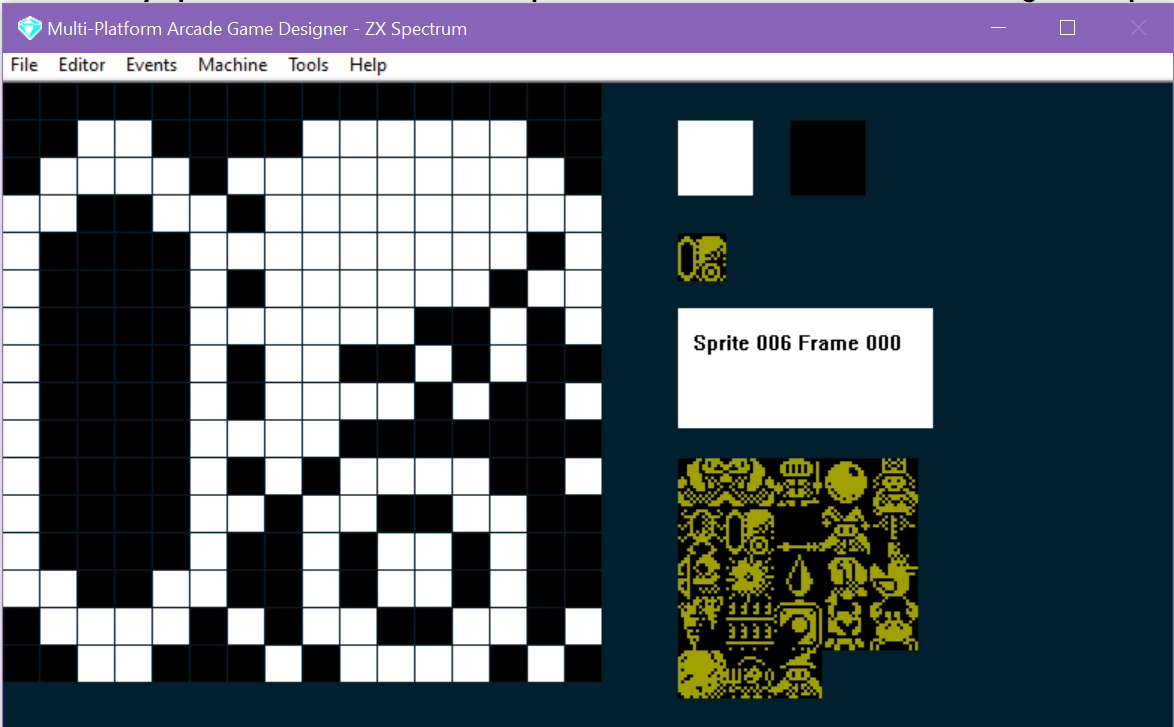
A continuación escribiremos el código del cañón. Lo mantendré lo más básico posible: lo único que quiero es poder colocar un cañón en una pantalla y, si no hay ya una bala de cañón en juego, disparar una.
Este es el código:
IF IMAGE 6
   SPRITEINK 11
   IF S = 0                                ; if there is no cannonball currently in play
      IF FRAME = 0                         ; if the cannon is facing left
	 SUBTRACT 8 FROM X                 ; 8 pixels to the left of the canon
         SPAWN 8 3                         ; spawn a cannonball (TYPE = 8 IMAGE = 3)
	 ADD 8 TO X                        ; reset the cannons X co-ord so it doesn't move
	 LET S = 1                         ; the cannonball should go left
      ELSE                                 ; the cannon is facing right
	 ADD 8 TO X                        ; 8 pixels to the right of the cannon
         SPAWN 8 3                         ; spawn a cannonball
	 SUBTRACT 8 FROM X                 ; reset the cannons x co-ord so it doesn't move
	 LET S = 2                         ; the cannonball should go right
      ENDIF
   ENDIF
ENDIF
Así que lo único que hacemos aquí es comprobar si no hay ninguna bala de cañón en juego (la variable S), y luego ver si el cañón apunta a la izquierda o a la derecha (lo cual sabemos por el FRAME), después hacemos aparecer una CANNONBALL (que es mi IMAGE 3 y cuyo script de evento está en TYPE 8), y luego cambiamos la variable S a 1 o a 2 (lo que indica a los demás scripts que hay una bala de cañón en juego: 1 si va hacia la izquierda o 2 si va hacia la derecha)
A continuación crearemos el script de las balas de cañón.
IF IMAGE 3
   SPRITEINK 7
   IF S = 1                            ; is the cannonball going left?
      IF CANGOLEFT                     ; can it go left?
         SPRITELEFT                    ; go left
         IF SETTINGA = 0               ; has it just been fired?
	    LET SETTINGA = 1           ; remember we've fired it
            CRASH 50                   ; make a sound
            JUMP SETTINGB              ; jump (to the height stored in settingb)
         ENDIF
      ENDIF

      IF CANGODOWN                     ; if the cannonball cant go down, it must be on the ground
      ELSE
         IF SETTINGB >= 1              ; as long as SettingB isn't 0
	    SUBTRACT 1 FROM SETTINGB   ; reduce settingb (the height of the next jump) by 1
	 ENDIF
     	 CRASH 30                      ; make a sound
         JUMP SETTINGB                 ; bounce!
      ENDIF

      IF X <= LEFTEDGE                 ; has the cannonball reached the left edge of the screen?
	  REMOVE                       ; if so, remove the cannonball
	  LET S = 0                    ; remember there is no cannonball in play now
      ENDIF
   ENDIF

   IF S = 2                            ; is the cannonball going left?
      IF CANGORIGHT                    ; can it go left?
         SPRITERIGHT                   ; go left
         IF SETTINGA = 0               ; has it just been fired?
            LET SETTINGA = 1           ; remember we've fired it
            CRASH 50                   ; make a sound
            JUMP SETTINGB              ; jump (to the height stored in settingb)
         ENDIF
      ENDIF

      IF CANGODOWN                     ; if the cannonball cant go down, it must be on the ground
      ELSE
         IF SETTINGB >= 1              ; as long as SettingB isn't 0
	    SUBTRACT 1 FROM SETTINGB   ; reduce settingb (the height of the next jump) by 1
	 ENDIF
     	 CRASH 30                      ; make a sound
         JUMP SETTINGB                 ; bounce!
      ENDIF

      IF X >= RIGHTEDGE                ; has the cannonball reached the left edge of the screen?
	 REMOVE                        ; if so, remove the cannonball
	 LET S = 0                     ; remember there is no cannonball in play now
      ENDIF
   ENDIF
ENDIF
Ahora bien, si has mirado el código con atención, te habrás dado cuenta de que no funcionará bien. Eso es porque necesita un valor en SETTINGB que determine la altura del JUMP (el rebote).
Así que fijaremos SETTINGB en el script SPRITE INITIALISATION... podríamos usar un valor fijo (es decir, LET SETTINGB = 10) o hacerlo aleatorio... quizá algo como...
   IF IMAGE 3
      LET SETTINGA = 0                  ; we need this to track whether it is the first jump
      GETRANDOM 6                       ; gets a  random number from 0 -5
      ADD 3 TO RND                      ; add 3 to it ( will now be in range 3 - 8)
      MULTIPLY RND BY 2                 ; multiply it by 2 (will now be in range 6 to 16)
      LET SETTINGB = RND                ; put the number in SettingB as the initial jump height
 ENDIF
O quizá usar una instrucción DATA y hacer READ SETTINGB desde ella, de modo que puedas tener una secuencia de alturas con las que las balas de cañón empiecen a saltar.
También tenemos que poner algo de código para inicializar el cañón. Recuerda que creé dos fotogramas, uno apuntando a la derecha y otro a la izquierda. Al inicializar un cañón, miraremos en qué lado de la pantalla está colocado y cambiaremos el fotograma para que apunte al lado contrario:
   IF IMAGE 6                                ; are you a cannon?
      IF X <= 127                            ; are you on the left side of the screen?
	 LET FRAME = 1                       ; if so point right
      ELSE                                   ; otherwise you must be on the right
	 LET FRAME = 0                       ; so point left
      ENDIF
   ENDIF
Así que, en su forma más simple, así es como se hace. Obviamente querrás escribir algún script de COLLISION que determine qué ocurre cuando la bala de cañón alcanza al jugador.
Además, por la forma en que hemos estructurado el script principal de la bala de cañón, sería muy fácil hacer que rebotara contra una pared. Todo lo que hay que hacer es comprobar el camino por delante para ver si la bala de cañón está a punto de chocar con un bloque de pared y, si es así, cambiar la variable S. Podemos hacerlo así (dentro del IF S = 1... es decir, cuando va hacia la izquierda):
	  SUBTRACT 1 FROM X
	  GETBLOCK X Y
	  ADD 1 TO X
	  IF BLOCK = WALLBLOCK
	     LET S = 2
	  ENDIF
Esto solo comprueba 1 píxel a la izquierda del sprite (recuerda que el valor de x es el lado izquierdo del sprite) para ver si es un bloque de pared y, si lo es, cambia S a 2, lo que la enviará hacia la derecha.
Luego, en el IF S = 2 ....ENDIF añadiremos:
	  ADD 16 TO X
	  GETBLOCK X Y
	  SUBTRACT 16 FROM X
	  IF BLOCK = WALLBLOCK
	     LET S = 1
	  ENDIF
Ten en cuenta que tenemos que sumar 16 a X para comprobar lo que hay a la derecha del sprite
En realidad no estamos cambiando el valor de X del sprite, por eso siempre devolvemos X a su valor original en cuanto hemos hecho el GETBLOCK... si no, tu sprite se moverá de forma incorrecta.
Así que ahora nuestro código debería quedar así:
IF IMAGE 3
   SPRITEINK 7
   IF S = 1                            ; is the cannonball going left?
      IF CANGOLEFT                     ; can it go left?
         SPRITELEFT                    ; go left
         IF SETTINGA = 0               ; has it just been fired?
	    LET SETTINGA = 1           ; remember we've fired it
            CRASH 50                   ; make a sound
            JUMP SETTINGB              ; jump (to the height stored in settingb)
         ENDIF
      ENDIF

      IF CANGODOWN                     ; if the cannonball cant go down, it must be on the ground
      ELSE
	 IF SETTINGB >= 1              ; as long as SettingB isn't 0
	    SUBTRACT 1 FROM SETTINGB   ; reduce settingb (the height of the next jump) by 1
	 ENDIF
     	 CRASH 30                      ; make a sound
         JUMP SETTINGB                 ; bounce!
      ENDIF

	  IF X <= LEFTEDGE                 ; has the cannonball reached the left edge of the screen?
	    REMOVE                        ; if so, remove the cannonball
	    LET S = 0                     ; remember there is no cannonball in play now
	  ENDIF

	  SUBTRACT 1 FROM X
	  GETBLOCK X Y
	  ADD 1 TO X
	  IF BLOCK = WALLBLOCK
	     LET S = 2
	  ENDIF


   ENDIF

   IF S = 2                            ; is the cannonball going left?
      IF CANGORIGHT                    ; can it go left?
         SPRITERIGHT                   ; go left
         IF SETTINGA = 0               ; has it just been fired?
            LET SETTINGA = 1           ; remember we've fired it
            CRASH 50                   ; make a sound
            JUMP SETTINGB              ; jump (to the height stored in settingb)
         ENDIF
      ENDIF

      IF CANGODOWN                     ; if the cannonball cant go down, it must be on the ground
      ELSE
         IF SETTINGB >= 1              ; as long as SettingB isn't 0
            SUBTRACT 1 FROM SETTINGB   ; reduce settingb (the height of the next jump) by 1
	 ENDIF
     	 CRASH 30                      ; make a sound
         JUMP SETTINGB                 ; bounce!
      ENDIF

	  IF X >= RIGHTEDGE                ; has the cannonball reached the left edge of the screen?
		REMOVE                         ; if so, remove the cannonball
		LET S = 0                      ; remember there is no cannonball in play now
	  ENDIF

	  ADD 16 TO X
	  GETBLOCK X Y
	  SUBTRACT 16 FROM X
	  IF BLOCK = WALLBLOCK
	     LET S = 1
	  ENDIF
   ENDIF
ENDIF
Lo cual debería acabar pareciéndose a esto:
Podrías adaptar fácilmente este script a tus propios juegos. Recuerda que lo mantuve simple y solo permito una bala de cañón en juego a la vez, lo que me permite tener otros sprites en pantalla (hay que tener cuidado de no superar el máximo por pantalla, o pasarán cosas raras).
¡Espero que te sirva de ayuda!