
Los Grabbers son divertidos, ¿verdad?, como en un salón recreativo junto al mar: lanzas monedas a la máquina y te vas decepcionado. Pero un Grabber puede ser divertido en tu juego; quizá para mover objetos de un lado a otro, o para agarrar a un enemigo y soltarlo en un foso de fuego de la perdición.
Creé este script para el Episodio 3 de Cocoa2: 24 Hour Parsley People, pero lo he simplificado aquí para que puedas adaptarlo fácilmente a tus propios juegos.
Cuando lo tengas funcionando, debería verse más o menos así...
Esto es lo que tendremos que crear:
Un sprite de 2 fotogramas para el propio Grabber
Un sprite para los controles del Grabber
Algo de script para el jugador
Script para el Grabber
Script para los sprites que se pueden agarrar.
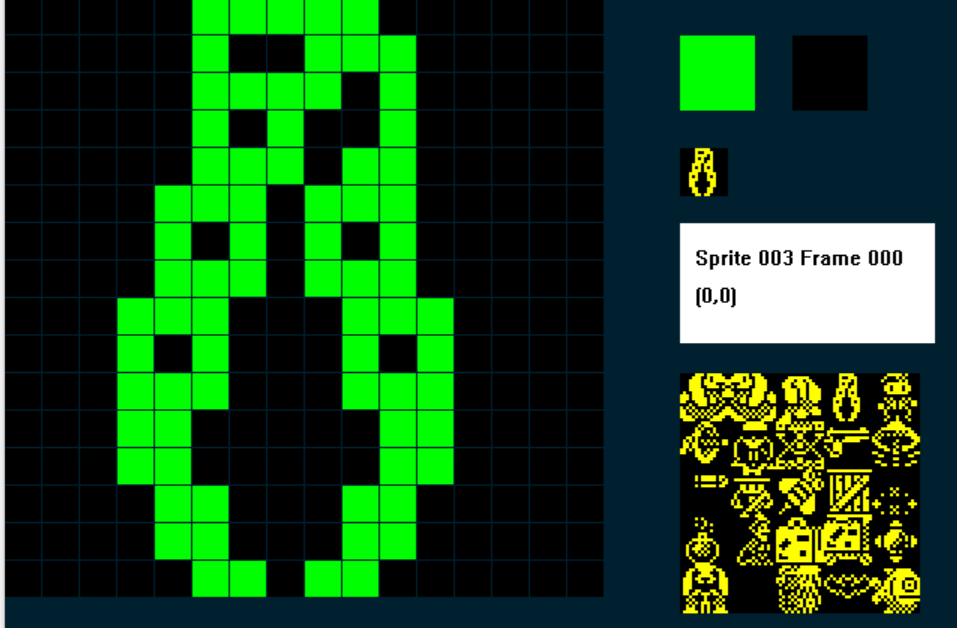
Sprite del Grabber
Este es el que usé; necesitamos dos fotogramas, y el fotograma 0 muestra el Grabber cerrado:
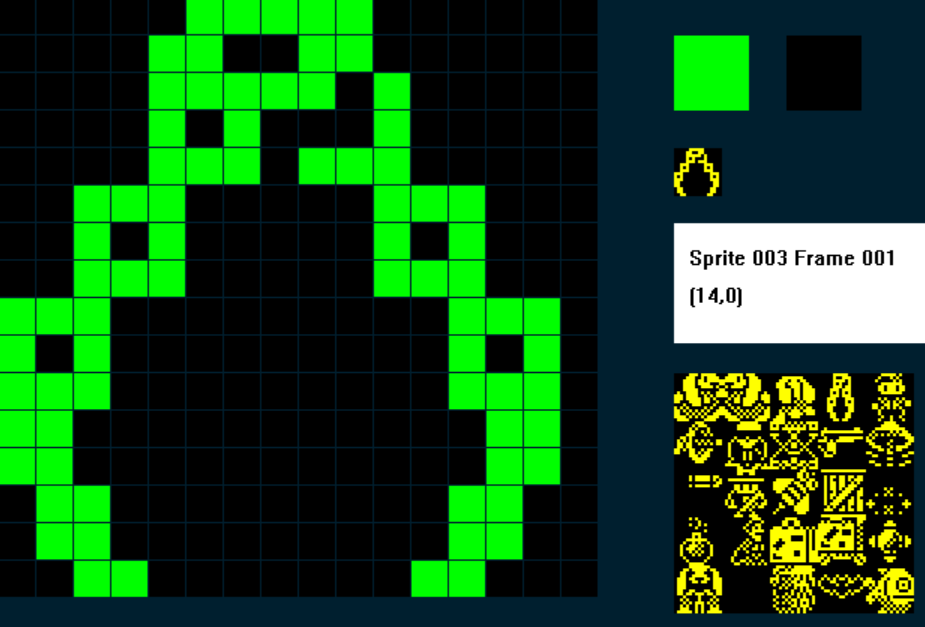
Y el fotograma 1 muestra el Grabber abierto:
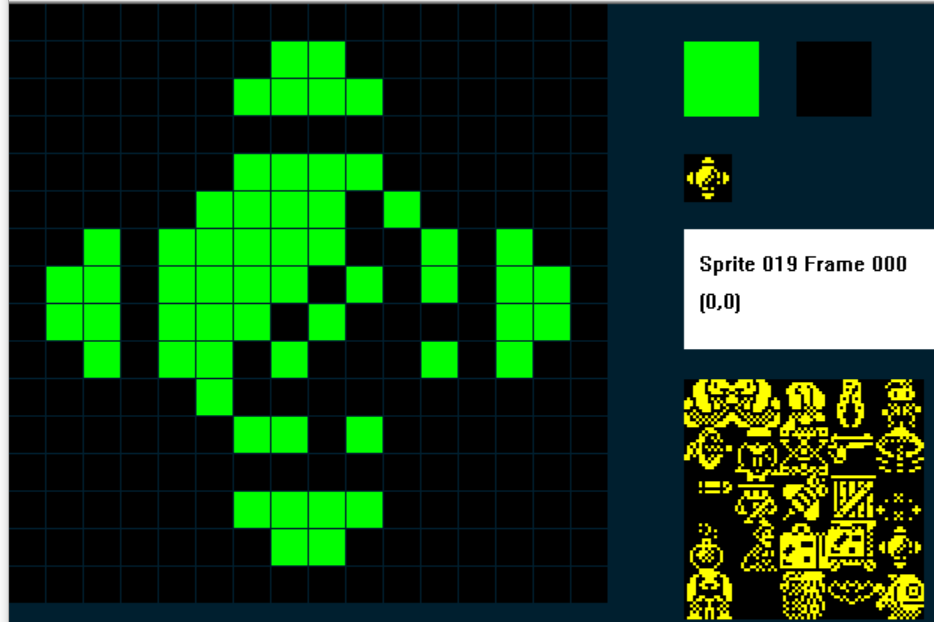
2. Controles del Grabber
También necesitaremos un sprite para los controles de la máquina; cuando nuestro jugador choque con los controles, podrá manejar el Grabber... Yo opté por algo parecido a un joystick...
3. El script del jugador.
Supongo que estás escribiendo un juego de plataformas o aventura estándar con vista lateral, así que probablemente ya tengas un montón de script para tu jugador. Lo que necesitamos es una variable que determine en qué modo está el jugador: modo normal o modo Grabber.
En mi ejemplo voy a usar C para guardar el valor del modo.
Así, cuando C=1 el jugador está en modo normal y puede correr y saltar como siempre; cuando C = 2, el jugador está en modo Grabber: el jugador ya no se mueve, sino que se mueve el Grabber.
Así que mi script del jugador, a grandes rasgos, será algo así:
IF C = 1 ; modo normal
....haz todo lo normal
ENDIF
IF C = 2
...haz todo lo del Grabber
ENDIF.
Lo siguiente que necesito es una variable que guarde las distintas cosas que puede hacer el Grabber; las he llamado estados del Grabber y uso la variable M.
¡Hay bastantes estados!
M = 0 ; Reinicia el Grabber para que vuelva a su posición inicial
M = 10 ; mueve el Grabber a la izquierda
M = 11 ; mueve el Grabber a la derecha
M = 12 ; el Grabber sube pero no ha agarrado nada
M = 13 ; el Grabber baja pero no ha agarrado nada
M = 15 ; el Grabber ha agarrado algo y está subiendo
M = 19 ; el Grabber ha llegado arriba y lleva algo enganchado
M = 20 ; el Grabber va a la izquierda y lleva algo agarrado
M= 21 ; el Grabber va a la derecha y lleva algo agarrado
M = 23 ; el Grabber baja y lleva algo enganchado
Así que, en el script de tu jugador, envuelve todo lo que has hecho hasta ahora dentro de:
IF C = 1 ; modo normal
ENDIF
Debajo añadiremos nuestro script del Grabber (prepárate... ¡es grande!):
;GRABBER MODE
;================
IF IMAGE = 3 ; if grabber on screen
IF C = 2 ; if player is in Grabber Mode mode
SPRITEINK 5 ; turn the Grabber cyan to show it is active
IF M < 12 ; Graber Statuses less than 12 are movements horizontally
IF KEY LEFT ; if Left key is pressed
LET M = 10 ; set grabber status to move left
ELSE ; else
IF KEY RIGHT ; if Right key is pressed
LET M = 11 ; set grabber status to move right
ENDIF
ENDIF
ENDIF
IF M = 0 ; RESET THE GRABBER
IF X <= 239 ; are we at the right edge of the screen?
IF CANGORIGHT ; no, so keep going right until we are
SPRITERIGHT ; move the grabber right, if it can
ENDIF
ENDIF
ENDIF
IF M = 10 ; move left - nothing attached
LET FRAME = 1 ; make sure Grabber is on the Open frame
IF X >= 4 ; are we at the left edge of the screen
IF CANGOLEFT ; no, so keep going left until we are
SPRITELEFT ; move the grabber left, if it can
ELSE ; if grabber can't go left
LET M = 0 ; reset the grabber status
ENDIF
IF KEY DOWN ; if the down key is pressed
LET M = 13 ; set grabber status to move down
ENDIF
ELSE ; if grabber reaches the left edge
LET M = 0 ; reset the grabber status
ENDIF
ENDIF
IF M = 11 ; MOVE RIGHT - NOTHING ATTACHED
LET FRAME = 1 ; make sure Grabber is on the Open frame
IF X <= 239 ; are we at the right edge of the screen
IF CANGORIGHT ; no, so keep going right until we are
SPRITERIGHT
ELSE
LET M = 0 ; reset the grabber
ENDIF
IF KEY DOWN ; down pressed?
LET M = 13 ; down mode
ENDIF
ELSE
LET M = 0 ; reset if we are at right edge
ENDIF
ENDIF
IF M = 12 ; GO UP - NOTHING ATTACHED
IF CANGOUP ; if grabber can go up
LET FRAME = 1 ; make sure grabber is on the open frame
SPRITEUP ; move the grabber up
LET SETTINGA = X ; store the X co-ord of the Grabber in SETTINGA
LET SETTINGB = Y ; store the Y co-ord of the Grabber in SETTINGB
ADD 6 TO SETTINGA ; add 6 to SETTINGA
DIVIDE SETTINGB BY 2 ; divide SETTINGB (Y) by two
MULTIPLY SETTINGB BY 2 ; then multiply it by two, it's now always an even number
ADD 2 TO SETTINGB ; add two to it
PLOT SETTINGA SETTINGB ; plot a pixel at SA,SB
ADD 1 TO SETTINGA ; add 1 to SA
PLOT SETTINGA SETTINGB ; and plot another pixel - so we should get a 2px by 1px line
ELSE ; if grabber can't go up
LET M = 0 ; reset the grabber
ENDIF
ENDIF
IF M = 13 ; GO DOWN - NOTHING ATTACHED
IF COLLISION 4 ; HAS THE GRABBER HIT A TYPE 4 ITEM/ENEMY?
OTHER ; if so switch to the other sprite
LET J = X ; store the other sprite's X in J
LET K = Y ; and it's Y co-ord in K
ENDSPRITE ; switch back to the Grabber
ADD 10 TO J ; check the grabber is in the Hit Box
SUBTRACT F FROM J ; F is the Grabber's X, subtract it from J
IF J >= 4 ; did we hit in pixels 4-15?
IF J <= 16
LET M = 15 ; If so set grabber status to GO UP - ATTACHED
OTHER ; switch to the sprite that has been grabbed
LET DIRECTION = 1 ; set it's direction to 1
ADD 1 TO Y ; add 1 to its Y - (cosmetically looks better)
LET X = F ; make sure it has the same X co-ord as the Grabbers
ENDSPRITE ; switch back to the Grabber
ELSE ; if the grabber MISSED TO THE RIGHT OF the Hit Box
LET M = 12 ; set the Grabber to GO UP - NOTHING ATTACHED
ENDIF
ELSE ; if the grabber missed to the left of the Hit Box
LET M = 12 ; set the Grabber to GO UP - NOTHING ATTACHED
ENDIF
ELSE ; if the Grabber hasn't an enemy
IF CANGODOWN ; if it can go down
LET FRAME = 1 ; make sure we are displaying the open grabber frame
SPRITEDOWN ; move the grabber down
LET SETTINGA = X ; store Grabber X in SettingA
LET SETTINGB = Y ; and Grabber Y in SettingB
ADD 6 TO SETTINGA ; Add 6 to SA (X)
DIVIDE SETTINGB BY 2 ; Divide SB (Y) by 2
MULTIPLY SETTINGB BY 2 ; multiply it by 2 to make sure it is an even number
INK 15 ; use cyan ink
PLOT SETTINGA SETTINGB ; plot a pixel a SA,SB
ADD 1 TO SETTINGA ; add 1 to SA
PLOT SETTINGA SETTINGB ; and plot another pixel - so we should get a 2px by 1px line
ELSE
LET M = 12
ENDIF
ENDIF
ENDIF
IF M = 15 ; GO UP - ATTACHED
IF CANGOUP ; if the grabber hasn't reached the top
LET FRAME = 0 ; display the Grabber Closed frame
SPRITEUP ; move the grabber up
LET SETTINGA = X ; store Grabber X in SettingA
LET SETTINGB = Y ; and Grabber Y in SettingB
ADD 6 TO SETTINGA ; Add 6 to SA (X)
DIVIDE SETTINGB BY 2 ; Divide SB (Y) by 2
MULTIPLY SETTINGB BY 2 ; multiply it by 2 to make sure it is an even number
ADD 2 TO SETTINGB ; and add two to it (wo we can over print the lowest link of the chain)
INK 15 ; use cyan ink
PLOT SETTINGA SETTINGB ; plot a pixel a SA,SB, this will cancel out the previous plot
ADD 1 TO SETTINGA ; add 1 to SA
PLOT SETTINGA SETTINGB ; and over plot another pixel - the lowest link of the chain will disappear
ELSE
LET M = 19 ; if we can't go up, set grabber to REACH TOP ATTACHED
ENDIF
ENDIF
IF M = 19 ; REACHED TOP ATTACHED
IF KEY LEFT ; if player presses the Left key
LET M = 20 ; set Grabber to GO LEFT ATTACHED
ELSE
IF KEY RIGHT ; if player presses the right key
LET M = 21 ; set Grabber to Go right attached
ELSE
IF KEY DOWN ; if player presses the down key
LET M = 23 ; set Grabber to GO DOWN ATTACHED
ENDIF
ENDIF
ENDIF
ENDIF
IF M = 20 ; GO LEFT - ATTACHED
LET FRAME = 0 ; make sure the grabber is displaying the closed frame
IF X >= 4 ; if the grabber isnt at the left edge
IF CANGOLEFT ; and it can go left
SPRITELEFT ; go left
ENDIF
IF KEY DOWN ; if the player presses the down key?
LET M = 23 ; set grabber to go down attached
ENDIF
ELSE ; if grabber has reached the left edge
LET M = 0 ; reset the grabber
ENDIF
ENDIF
IF M = 21 ; GO RIGHT - ATTACHED
LET FRAME = 0 ; make sure the grabber is displaying the closed frame
IF X <= 239 ; if the grabber isnt at the right edge
IF CANGORIGHT ; and it can go right
SPRITERIGHT ; go right
ENDIF
IF KEY DOWN ; if the player presses the down key?
LET M = 23 ; set grabber to go down attached
ENDIF
ELSE ; if grabber has reached the right edge
LET M = 0 ; reset the grabber
ENDIF
ENDIF
IF M = 23 ; GO DOWN - ATTACHED
IF CANGODOWN ; if the grabber hasn't reached the bottom
LET FRAME = 0 ; display the Grabber Closed frame
SPRITEDOWN ; go down
LET SETTINGA = X ; store Grabber X in SettingA
LET SETTINGB = Y ; and Grabber Y in SettingB
ADD 6 TO SETTINGA ; Add 6 to SA (X)
DIVIDE SETTINGB BY 2 ; Divide SB (Y) by 2
MULTIPLY SETTINGB BY 2 ; multiply it by 2 to make sure it is an even number
PLOT SETTINGA SETTINGB ; plot a pixel at SA, SB
ADD 1 TO SETTINGA ; add one to SA
PLOT SETTINGA SETTINGB ; and plot another pixel, so we have a 2x1 pixel line
ELSE
LET M = 12 ; if we reach the bottom, release whatever we had grabbed
ENDIF ; and GO UP - NOTHING ATTACHED
ENDIF
ENDIF
LET F = X ; store the Grabber X in F
LET G = Y ; and the grabber Y in G
ENDIF ; END OF GRABBER MODE4. El script del Grabber
Bien, eso controlará el Grabber. Pero también necesitamos añadir código para el propio Grabber. En esencia, el Grabber debe estar visible en pantalla pero sin hacer nada hasta que el jugador toque los controles. Por eso usaremos otro tipo de sprite y pondremos inicialmente el Grabber con ese tipo; cuando el jugador choque con los controles, haremos que el Grabber cambie su tipo de sprite a 0 (jugador), permitiendo así que el jugador lo controle.
Voy a usar el tipo 8
;=======================================INACTIVE GRABBER
IF IMAGE 3              ; the Grabber Sprite
   IF C = 2             ; if player is in Grabber Mode
      LET TYPE = 0      ; change Grabber's TYPE to 0 so we can control it
   ENDIF
   STOPFALL             ; stop the Grabber from falling
ENDIF
Bastante sencillo: si C = 2, el jugador está en modo Grabber, así que cambia el tipo de sprite del Grabber a 0.
5. El script de los controles del Grabber
Esto también es sencillo: el sprite de controles del Grabber está quieto, es básicamente un interruptor; lo tocas y pasan cosas. El jugador no puede moverse, sino que ahora controla el Grabber:
;========================================GRABBER CONTROLS

IF IMAGE 19             ; the grabber controls sprite
   IF COLLISION 0       ; if player touches the controls
      LET C = 2         ; put the player into Grabber Mode
      LET J = X         ; store the controls X coord in J
      LET K = Y         ; store the controls Y co-ord in K
   ELSE                 ; if player isn't touching controls
      LET C = 1         ; put the player in Normal Mode
   ENDIF
ENDIF
6. Algo de script para los sprites que se pueden agarrar
En Cocoa2:24 Hour Parsley People hice un montón de sprites 'agarrables' con distintas consecuencias; en esta versión simplificada nos limitaremos a uno.
Necesitará una variable (una local sirve... voy a usar DIRECTION) que nos diga si el objeto ha sido agarrado o no. Después, según el valor actual de M (¿te acuerdas de él del principio?) sabremos hacia dónde va el Grabber, de modo que el objeto agarrado se mueva a la par... ¡magia!
Así, cuando DIRECTION = 1, el sprite ha sido agarrado; en el evento de tu sprite añade:
IF IMAGE = 17
   IF DIRECTION = 1                ; we set Direction to 1 when the Grabber grabs this sprite
      IF C = 2                     ; check player is in Grabber Mode
         IF M <> 0                 ; if Grabber is doing something
            IF CANGOUP             ; if Grabber can go up
               LET Y = G           ; align the Grabbed sprite with the Grabber
               ADD 16 TO Y         ; then put the Grabbed sprite directly below the grabber
            ENDIF
         ENDIF
         IF M < 15                 ; Grabber Statuses < 15 require releasing any grabbed sprites
            FALL                   ; so release the Grabbed sprite
            LET DIRECTION = 0      ; The sprite is no longer grabbed
         ENDIF
         IF M = 20                 ; GO LEFT - ATTACHED
            IF CANGOLEFT           ; if sprite can go left
               SPRITELEFT          ; go left
            ELSE                   ; if it cant go left
               FALL                ; fall
               LET DIRECTION = 0   ; The sprite is no longer grabbed
               LET M = 0           ; reset the grabber
            ENDIF
         ENDIF

         IF M = 21                 ; GO RIGHT - ATTACHED
            IF CANGORIGHT          ; if sprite can go right
               SPRITERIGHT         ; go right
            ELSE                   ; if it can't go right
               FALL                ; fall back down
               LET DIRECTION = 0   ; The sprite is no longer grabbed
               LET M = 0           ; reset the grabber
            ENDIF
         ENDIF

         IF M = 23                 ; GO DOWN ATTACHED
            IF CANGODOWN
            ELSE                   ; if the grabbed item has reached solid ground
               LET M = 12          ; set the Grabber to GO UP - NOTHING ATTACHED
               LET DIRECTION = 0   ; The sprite is no longer grabbed
            ENDIF
         ENDIF
      ELSE                         ; grabbed sprite should fall whenever player is not in Grabber Mode
         FALL
      ENDIF
   ENDIF
ENDIF
...por supuesto, tendrás que ajustarlo a los números de IMAGE correctos de tu juego.
Por último, tenemos que añadir código al script del jugador que le permita volver al modo normal saliendo de los controles del Grabber. Lo añadiremos al final del evento del jugador y, solo cuando el Grabber no esté en acción, el jugador podrá pulsar el botón de disparo para soltarse de los controles del Grabber:
IF C = 2                                       ; We need a way for the player to release the controls to the grabber
   IF M = 0                                    ; if the Grabber is not in action
      IF KEY FIRE1                             ; and player presses the fire key
         IF IMAGE = 3                          ; switch the grabber (Image 3)
             LET TYPE = 8                      ; to TYPE 8
         ENDIF
         IF IMAGE <> 3                         ; the players sprites are 0-2 in my example
            LET C = 1                          ; switch back to Normal player mode
            IF X <= J                          ; if player is to the left of the Grabber controls
               IF CANGOLEFT                    ; move the player left, so he is no longer touching the controls
                  SPRITELEFT
               ENDIF
            ELSE                               ; if player is to the right of the Grabber controls
               IF CANGORIGHT                   ; move the player left, so he is no longer touching the controls
                  SPRITERIGHT
               ENDIF
            ENDIF
            LET M = 0                          ; make sure the Grabber is reset
            LET SETTINGA = 0                   ; reset setting A
            LET SETTINGB = 0                   ; and reset SETTINGB
         ENDIF
      ENDIF
   ENDIF
ENDIF
Por último, añade tu Grabber a la pantalla con el editor SPRITEPOSITIONS; recuerda poner inicialmente tu Grabber en el TIPO inactivo (en mi ejemplo de arriba el Grabber es de TIPO 8 hasta que se activa, momento en que pasa a ser de TIPO 0 (evento del jugador)
¡Y eso es todo!
Así, las reglas de esta mecánica son:
El jugador toca los controles
El jugador queda inactivo
El Grabber se activa
Al pulsar izquierda, el Grabber se desplaza por la grúa hacia la izquierda; para que sea interesante, como en una máquina de garra, seguirá moviéndose a la izquierda hasta que pulsemos derecha o abajo (¡aunque suelte la izquierda!). Lo mismo con los movimientos hacia la derecha y hacia abajo
El Grabber tiene que tocar un objeto agarrable dentro de una zona de impacto, no demasiado a la izquierda ni a la derecha... ¡para que siga siendo un reto!
El Grabber y el objeto agarrado deben volver a la parte superior de la grúa para poder moverse luego a la derecha o a la izquierda
Si el Grabber llega al borde izquierdo o derecho, o se ve impedido de otro modo, ¡soltará lo que hubiera agarrado!
El jugador pulsa abajo para soltar el objeto agarrado en el lugar deseado.
El jugador pulsa disparo cuando el Grabber no está en movimiento, para salir de los controles del Grabber y volver al modo normal
Cuando lo tengas funcionando, intenta adaptarlo para añadir más cosas divertidas... aquí tienes algunos ejemplos de Cocoa 2: 24 Hour Parsley People