
Hasta ahora, Stinky Dog puede moverse a izquierda y derecha, subir y bajar escaleras, y SALTAR. Son cinco teclas. Pero ¿y si le damos un superpoder? Estoy pensando en darle la capacidad de soltar pedos nocivos, que luego suben por la pantalla...y quizá dejen K.O. a nuestro enemigo, Sideways Clive...o alguna tontería por el estilo.
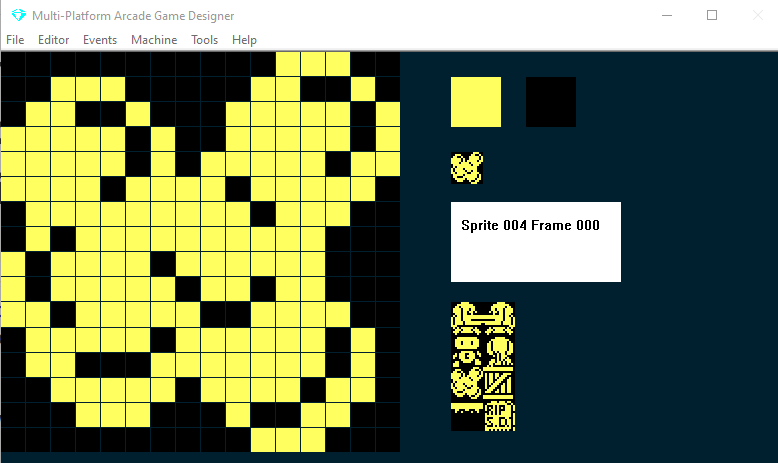
Primero, vamos a crear un sprite nuevo de pedo (nadie dijo nunca que este fuera a ser un juego de altos vuelos). Esto servirá:
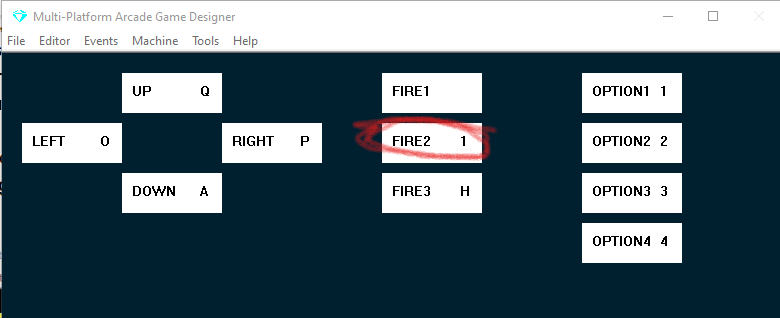
Ahora vamos a necesitar una nueva comprobación de tecla en nuestro evento Player para, bueno, soltar un pedo... usaremos la tecla 1 y la asociaremos a FIRE2: en el menú Editor selecciona Keyboard Controls, haz clic en el cuadro FIRE2 y pulsa tu tecla 1:
A continuación abriremos nuestro PLAYER EVENT y añadiremos algo de código para liberar el pedo...colócalo debajo de la instrucción IF que controla el SALTO (debajo de su ENDIF)
IF KEY FIRE2              ; is the FIRE2 key being pressed?
   SPAWN 2 4              ; SPAWN a fart (TYPE 2, IMAGE 4)
ENDIF
SPAWN tiene dos argumentos: el primero determina el TYPE (que luego podemos programar en el evento 'Sprite Type 2') y la IMAGE del sprite que se generará (en mi ejemplo la imagen es la número 4; obviamente puedes cambiarlos según tu juego).
Probemos el juego a ver qué pasa.
Vale, como era de esperar, la cosa no fue bien.
Hay varias lecciones aquí.
Cuando nuestro sprite del jugador genera (SPAWN) otro sprite, el nuevo sprite aparece en la misma posición X e Y que el jugador
Si mantienes el dedo en el botón FIRE2, seguirá generando sprites nuevos. Y MPAGD solo puede manejar 12 sprites en pantalla a la vez.
Así que vamos a tener que establecer algunos controles:
Limitaremos a Stinky Dog a tener un solo pedo activo a la vez
¡Necesitamos que el pedo salga de su trasero!
Primero, crearemos una variable nueva, F, que registrará si hay o no un pedo 'en juego'; la pondremos a 0 (ningún pedo en juego) en nuestro evento RESTARTSCREEN con un simple:
LET F = 0 ; when we start a screen, there is no fart in play
Luego, en el evento del jugador ampliaremos nuestro código FIRE2 para que solo genere un pedo cuando F sea 0
IF KEY FIRE2              ; is the FIRE2 key being pressed?
   IF F = 0               ; if there is no fart in play
      SPAWN 2 4           ; SPAWN a fart (TYPE 2, IMAGE 4)
      LET F = 1           ; there is now a fart in play
   ENDIF
ENDIF
Así que ahora, al probar el juego, Stinky Dog soltará un único pedo, porque ponemos F a 1 inmediatamente después del SPAWN para evitar otra tanda de flatulencias.
Pero sigue apareciendo justo encima de Stinky Dog.
Ahora, recuerda que cuando editamos el script del jugador en la Parte 14 añadimos una línea de código en las cláusulas de ir a la izquierda y a la derecha:
LET DIRECTION = LEFT
LET DIRECTION = RIGHT
Lo hicimos para recordar hacia qué lado mira y se desplaza Stinky Dog.
Así que podemos usarlo para reposicionar el pedo. Mejoremos un poco más nuestro código FIRE2:
IF KEY FIRE2                    ; is the FIRE2 key being pressed?
   IF F = 0                     ; if there is no fart in play
      IF DIRECTION = LEFT       ; if Stinky Dog is facing Left
         ADD 16 TO X            ; set X 16 pixels to the right
         SPAWN 2 4              ; SPAWN a fart (TYPE 2, IMAGE 4)
         SUBTRACT 16 FROM X     ; reset X to its original position
         LET F = 1              ; there is now a fart in play
      ELSE
         IF DIRECTION = RIGHT   ; if Stinky Dog is facing Right
            SUBTRACT 16 FROM X  ; set X 16 pixels to the left
            SPAWN 2 4           ; SPAWN a fart (TYPE 2, IMAGE 4)
            ADD 16 TO X         ; reset X to its original position
            LET F = 1           ; there is now a fart in play
         ENDIF
      ENDIF
   ENDIF
ENDIF
Como el programa recorre secuencialmente cada evento, podemos manipular el valor X de Stinky Dog, generar el pedo y restablecer el valor X para que el propio Stinky Dog no se mueva.
Prueba tu juego otra vez, con suerte pasará esto...
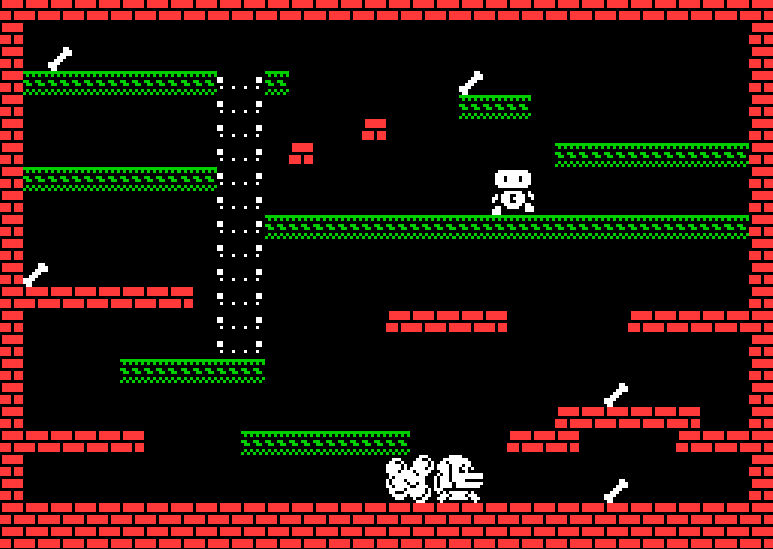
Se libera un pedo por el trasero de Stinky Dog. Pero se queda ahí. Sin hacer nada. Vayamos a nuestro SPRITE TYPE 2 EVENT.
Quiero que funcione así:
Stinky Dog se tira un pedo
El pedo se queda un rato por ahí
El pedo sube por la pantalla
Si el pedo alcanza a nuestro enemigo, Sideways Clive, este queda K.O. un rato y deja de moverse
Hasta ahora hemos conseguido la parte 1, echemos un vistazo a las partes 2 y 3.
Vamos a necesitar un temporizador que cuente, digamos, 1 segundo. Este temporizador será local al pedo, así que podemos usar una de las variables específicas del sprite; voy a usar SETTINGA.
Ahora bien, MPAGD funciona a 25 fotogramas por segundo, así que si incrementamos SettingA en 1, debería tardar aproximadamente 1 segundo en llegar a 25.
Cuando llegue a 25 queremos que empiece a subir por la pantalla. Así podemos conseguir todo esto:
IF SETTINGA < 25                    ; IF SETTINGA is less than 25
   ADD 1 TO SETTINGA                ; increment it
ELSE                                ; otherwise if it is 25
   SPRITEUP                         ; move the fart upwards
ENDIF
Vamos a probarlo:
Vale, más o menos funciona: el pedo sigue subiendo por la pantalla, pero cuando llega arriba da la vuelta y aparece otra vez abajo.
Vamos a añadir algo más de código que elimine el pedo cuando llegue arriba, ¡y permita a Stinky Dog soltar otro!
Lo añadiremos a nuestro evento SPRITE TYPE 2:
IF Y <= TOPEDGE             ; if the fart reaches the top of the play area
   REMOVE                   ; remove the fart
   LET F = 0                ; reset F to No Fart in Play
ENDIF
Recuerda que, a diferencia de un gráfico, el eje Y del Spectrum es 0 arriba, no abajo. Así que cuando la Y del pedo llegue a TOPEDGE, haremos REMOVE del sprite y restableceremos a 0 nuestra variable de pedo en juego (F), lo que significa que ya no hay ninguno en pantalla.
Bien, ahora que hemos escrito el código del pedo, tenemos que atender a lo que pasa cuando alcanza a Sideways Clive. Queremos dejarlo K.O. un rato y que deje de moverse.
Veamos el código de Sideways Clive que dejamos que MPAGD generara por nosotros en la Parte 10 , le he añadido comentarios para ayudarte a entender cada línea:
IF DIRECTION = LEFT                 ; if direction is set to left
    IF CANGOLEFT                    ; and there is nothing in the way
        SPRITELEFT                  ; move sideways clive left
        SUBTRACT 16 FROM X          ; check 16 pixels to the left of clive
        IF CANGODOWN                ; would he be able to go down there?
            LET DIRECTION = RIGHT   ; if so change direction to RIGHT
            LET IMAGE = 2           ; make sure we are on image 2
            LET FRAME = 0           ; and make sure its the first frame
        ENDIF
        ADD 16 TO X                 ; reset x to its original value
    ELSE                            ; if he cant go left
        LET DIRECTION = RIGHT       ; change direction to right
        LET IMAGE = 2               ; make sure we are on image 2
        LET FRAME = 0               ; and make sure its the first frame
    ENDIF
ELSE                            ; if DIRECTION isnt left, it must be RIGHT
    IF CANGORIGHT               ; if clive can go right (
        SPRITERIGHT              ; go right
        ADD 16 TO X               ; check 16 pixels to the right of clive
        IF CANGODOWN              ; if he was there, would he fall down?
            LET DIRECTION = LEFT  ; if so, change direction to left
            LET IMAGE = 2         ; make sure we are on image 2
            LET FRAME = 0         ; and make sure its the first frame
        ENDIF
        SUBTRACT 16 FROM X        ; reset X to its original value
    ELSE                          ; if he can't go right
        LET DIRECTION = LEFT      ; change direction to left
        LET IMAGE = 2             ; make sure we are on image 2
        LET FRAME = 0             ; and make sure its the first frame
    ENDIF
ENDIF

ANIMATE                      ; cycle through Clives frames to animate him

IF COLLISION PLAYER          ; if Clive touches Stinky Dog
    KILL                     ; Kill Stinky Dog
ENDIF
Ahora, seguramente notarás que hay mucha repetición que en realidad no necesitamos. Y te aconsejo que intentes siempre ser lo más económico posible con tu código. El código de arriba supone que tienes imágenes distintas para mirar a la izquierda y a la derecha (como Stinky Dog), pero Sideways Clive siempre mira al frente ...y se desplaza de lado, de izquierda a derecha. Así que podemos eliminar de inmediato todas esas líneas LET IMAGE = 2, LET FRAME = 0 y ahorrarnos unos cuantos bytes:
IF DIRECTION = LEFT                 ; if direction is set to left
    IF CANGOLEFT                    ; and there is nothing in the way
        SPRITELEFT                  ; move sideways Clive left
        SUBTRACT 16 FROM X          ; check 16 pixels to the left of Clive
        IF CANGODOWN                ; would he be able to go down there?
            LET DIRECTION = RIGHT   ; if so change direction to RIGHT
        ENDIF
        ADD 16 TO X                 ; reset x to its original value
    ELSE                            ; if he cant go left
        LET DIRECTION = RIGHT       ; change direction to right
    ENDIF
ELSE                           ; if DIRECTION isn't left, it must be RIGHT
    IF CANGORIGHT               ; if Clive can go right (
        SPRITERIGHT             ; go right
        ADD 16 TO X               ; check 16 pixels to the right of Clive
        IF CANGODOWN              ; if he was there, would he fall down?
            LET DIRECTION = LEFT  ; if so, change direction to left
        ENDIF
        SUBTRACT 16 FROM X        ; reset X to its original value
    ELSE                          ; if he can't go right
        LET DIRECTION = LEFT      ; change direction to left
    ENDIF
ENDIF

ANIMATE                      ; cycle through Clive's frames to animate him

IF COLLISION PLAYER          ; if Clive touches Stinky Dog
    KILL                     ; Kill Stinky Dog
ENDIF
Así que, tal como está ahora, si DIRECTION es LEFT Clive irá hacia la izquierda y si DIRECTION es RIGHT irá hacia la derecha.
Vamos a crear una nueva dirección, llamada STUNNED
Si Clive está STUNNED no se moverá en absoluto.
Primero, añadiremos código de colisión:
IF COLLISION 2             ; if Clive touches a Type 2 sprite (the fart)
   IF DIRECTION = LEFT     ; if Clive is going left
      LET SETTINGB = 0     ; remember the direction he was going, 0 = Left
   ELSE                    ; if he wasn't going left
      LET SETTINGB = 1     ; he was going RIGHT, 1 = RIGHT
   ENDIF
   LET DIRECTION = 5       ; set the direction to STUNNED
   LET SETTINGA = 0        ; start the stunned timer
   OTHER                   ; switch to the Fart
   REMOVE                  ; remove the fart
   ENDSPRITE               ; switch back to this event
   LET F = 0               ; reset the Fart in play to no fart in play
ENDIF
Un par de cosas a tener en cuenta aquí. Primero, no podemos usar cualquier etiqueta para DIRECTION: LEFT, RIGHT, UP & DOWN están permitidas, pero no podemos usar STUNNED, así que usaremos el valor 5 para indicar cuándo Clive está aturdido.
Segundo, hemos introducido el comando OTHER, que te permite cambiar al otro sprite implicado en la colisión, en este caso el pedo, y realizar alguna acción sobre él, en nuestro caso hacer un REMOVE. El comando ENDSPRITE le dirá a MPAGD que vuelva a este evento. Maneja OTHER con cuidado: puede ralentizar tu juego si haces demasiado con él, y termínalo siempre con ENDSPRITE.
Ahora adaptaremos nuestro código de movimiento para permitir el aturdimiento ...
IF DIRECTION = LEFT              ; if direction is set to left
   SPRITEINK 71
   IF CANGOLEFT                  ; and there is nothing in the way
      SPRITELEFT                 ; move sideways Clive left
      SUBTRACT 16 FROM X         ; check 16 pixels to the left of Clive
      IF CANGODOWN               ; would he be able to go down there?
         LET DIRECTION = RIGHT   ; if so change direction to RIGHT
      ENDIF
         ADD 16 TO X             ; reset x to its original value
   ELSE                          ; if he cant go left
      LET DIRECTION = RIGHT      ; change direction to right
   ENDIF
ELSE                             ; if DIRECTION isn't left
   IF DIRECTION = RIGHT          ; is it RIGHT, if so...
      SPRITEINK 71
      IF CANGORIGHT              ; if Clive can go right (
         SPRITERIGHT             ; go right
         ADD 16 TO X             ; check 16 pixels to the right of Clive
         IF CANGODOWN            ; if he was there, would he fall down?
            LET DIRECTION = LEFT ; if so, change direction to left
         ENDIF
         SUBTRACT 16 FROM X      ; reset X to its original value
      ELSE                       ; if he cant go right any more
         LET DIRECTION = LEFT    ; change direction to left
      ENDIF
   ELSE
      IF DIRECTION = 5           ; if clive is stunned
	     SPRITEINK 67        ; change him to magenta
         ADD 1 TO SETTINGA       ; increment the stun timer
         IF SETTINGA = 100       ; when timer reaches 100
            IF SETTINGB = 0      ; if previously he was going left
               LET DIRECTION = LEFT   ; go left
            ELSE                      ; otherwise
               LET DIRECTION = RIGHT  ; go right
            ENDIF
         ENDIF
      ENDIF
   ENDIF
ENDIF
Como puedes ver, he ampliado la cláusula principal IF...ELSE...ENDIF para contemplar lo que debe pasar cuando DIRECTION = 5 (es decir, cuando Clive está aturdido): lo cambiamos de blanco a magenta e incrementamos un temporizador de 4 segundos, al final del cual continuará en su dirección de avance anterior.
Por último, para rematar, ahora que en el código podemos saber en cualquier momento si Clive está aturdido o no, vamos a cambiar el código de la colisión con el jugador (Stinky Dog) para que Clive no pueda matar a Stinky Dog si está aturdido. Lo conseguimos simplemente cambiándolo a:
IF COLLISION PLAYER        ; if Clive touches Stinky Dog
   IF DIRECTION <> 5       ; and if Clive is not stunned
      KILL                 ; Kill Stinky Dog
   ENDIF
ENDIF
Vale, vamos a probarlo...
¿Soy yo o tenemos aquí el principio de algo que no es del todo una porquería?
Sé que este ha sido un tutorial largo, así que, como referencia, aquí tienes los eventos completos con los que hemos estado trabajando para que los compares con los tuyos:
EVENT PLAYER
;===============STINKY DOG=================
IF KEY LEFT                    ; Is the left key pressed?
    LET DIRECTION = LEFT       ; if so, remember I am going LEFT
    LET IMAGE = 1              ; display the left facing image
    IF X <= LEFTEDGE           ; are we at the left edge of the screen?
        SCREENLEFT             ; if so, go to the screen to left on the map
        LET X = RIGHTEDGE      ; and put me at the right edge of that screen
        EXIT                   ; and stop processing this event
    ELSE                       ; if I'm not at the left edge
        IF CANGOLEFT           ; is there space to the left of me?
            SPRITELEFT         ; if so move me left
            ANIMATE            ; and animate me
        ENDIF
    ENDIF
ENDIF

IF KEY RIGHT                   ; Is the right key pressed?
    LET DIRECTION = RIGHT      ; if so, remember I am going RIGHT
    LET IMAGE = 0              ; display the right facing image
    IF X >= RIGHTEDGE          ; Am I at the right edge of the screen?
        SCREENRIGHT            ; if so go to the screen to right on the map
        LET X = LEFTEDGE       ; and put me at the left edge
        EXIT                   ; and stop processing this event
    ELSE                       ; if I'm not at the right edge
        IF CANGORIGHT          ; is there space to the right of me?
            SPRITERIGHT        ; if so, move me right
            ANIMATE            ; and animate me?
        ENDIF
    ENDIF
ENDIF

IF KEY UP                      ; is the UP key pressed?
   ANIMATE SLOW                ; if so, animate me slowly
   IF LADDERABOVE              ; is there a ladder above me?
      IF CANGOUP               ; can I go up?
         LET IMAGE = 3         ; display the image of me climbing
    	 SPRITEUP              ; move me up
         LET DIRECTION = UP    ; remember I am going up
      ELSE                     ; if there is a ladder above me, but I cant go up
         ADD 1 TO Y            ; nudge me 1 pixel to the right
      ENDIF
   ELSE                        ; if there isn't a ladder above me
      SPRITELEFT               ; move me left
      IF LADDERABOVE           ; now is there a ladder above me?
      ELSE                     ; if not
         SPRITERIGHT           ; move me back where I was
         SPRITERIGHT           ; then a bit more to the right
         IF LADDERABOVE        ; now is there a ladder above me?
      	 ELSE                  ; if not
            SPRITELEFT         ; move me back where I was
         ENDIF
      ENDIF
   ENDIF
ENDIF


IF KEY DOWN                    ; is the DOWN key pressed?
   ANIMATE SLOW                ; if so, animate me slowly
   IF LADDERBELOW              ; is there a ladder below me?
      LET IMAGE = 3            ; if so, set my image to the climbing one
      SPRITEDOWN               ; move me down
      LET DIRECTION = DOWN     ; remember I am going down
   ELSE                        ; if there isn't a ladder below me
      SPRITELEFT               ; move me left
      IF LADDERBELOW           ; is there a ladder below me now?
      ELSE                     ; if not
         SPRITERIGHT           ; move me back where I was
         SPRITERIGHT           ; then a bit more to the right
         IF LADDERBELOW        ; now is there a ladder below me?
         ELSE                  ; if not
            SPRITELEFT         ; move me back where I was
         ENDIF
      ENDIF
   ENDIF
ENDIF


IF KEY FIRE                    ; is the Fire key being pressed?
    JUMP 7                     ; if so, make me Jump to height 7
ENDIF

IF KEY FIRE2                    ; is the FIRE2 key being pressed?
   IF F = 0                     ; if there is no fart in play
      IF DIRECTION = LEFT       ; if Stinky Dog is facing Left
         ADD 16 TO X            ; set X 16 pixels to the right
         SPAWN 2 4              ; SPAWN a fart (TYPE 2, IMAGE 4)
         SUBTRACT 16 FROM X     ; reset X to its original position
         LET F = 1              ; there is now a fart in play
      ELSE
         IF DIRECTION = RIGHT   ; if Stinky Dog is facing Right
            SUBTRACT 16 FROM X  ; set X 16 pixels to the left
            SPAWN 2 4           ; SPAWN a fart (TYPE 2, IMAGE 4)
            ADD 16 TO X         ; reset X to its original position
            LET F = 1           ; there is now a fart in play
         ENDIF
      ENDIF
   ENDIF
ENDIF


FALL                           ; make me fall if there is nothing below me

IF DEADLY                      ; am I touching something deadly?
    KILL                       ; if so, kill me
ENDIF

GETBLOCKS                      ; if I touch any collectible blocks, run the Collected Block script
EVENT SPRITETYPE1
;============SIDEWAYS CLIVE==================================
IF DIRECTION = LEFT ; if direction is set to left
SPRITEINK 71 ; BRIGHT WHITE
IF CANGOLEFT ; and there is nothing in the way
SPRITELEFT ; move sideways Clive left
SUBTRACT 16 FROM X ; check 16 pixels to the left of Clive
IF CANGODOWN ; would he be able to go down there?
LET DIRECTION = RIGHT ; if so change direction to RIGHT
ENDIF
ADD 16 TO X ; reset x to its original value
ELSE ; if he cant go left
LET DIRECTION = RIGHT ; change direction to right
ENDIF
ELSE ; if DIRECTION isn't left
IF DIRECTION = RIGHT ; is it RIGHT, if so...
SPRITEINK 71 ; BRIGHT WHITE
IF CANGORIGHT ; if Clive can go right (
SPRITERIGHT ; go right
ADD 16 TO X ; check 16 pixels to the right of Clive
IF CANGODOWN ; if he was there, would he fall down?
LET DIRECTION = LEFT ; if so, change direction to left
ENDIF
SUBTRACT 16 FROM X ; reset X to its original value
ELSE ; if he cant go right any more
LET DIRECTION = LEFT ; change direction to left
ENDIF
ELSE
IF DIRECTION = 5 ; if clive is stunned
SPRITEINK 67 ; change him to magenta
ADD 1 TO SETTINGA ; increment the stun timer
IF SETTINGA = 100 ; when timer reaches 100
IF SETTINGB = 0 ; if previously he was going left
LET DIRECTION = LEFT ; go left
ELSE ; otherwitse
LET DIRECTION = RIGHT ; go right
ENDIF
ENDIF
ENDIF
ENDIF
ENDIF
ANIMATE ; cycle through Clives frames to animate him
IF COLLISION PLAYER ; if Clive touches Stinky Dog
IF DIRECTION <> 5 ; and if Clive is not stunned
KILL ; Kill Stinky Dog
ENDIF
ENDIF
IF COLLISION 2 ; if Clive touches a Type 2 sprite (the fart)
IF DIRECTION = LEFT ; if Clive is going left
LET SETTINGB = 0 ; remember the direction he was going, 0 = Left
ELSE ; if he wasn't going left
LET SETTINGB = 1 ; he was going RIGHT, 1 = RIGHT
ENDIF
LET DIRECTION = 5 ; set the direction to STUNNED
LET SETTINGA = 0 ; start the stunned timer
OTHER ; switch to the Fart
REMOVE ; remove the fart
ENDSPRITE ; switch back to this event
LET F = 0 ; reset the Fart in play to no fart in play
ENDIFEVENT SPRITETYPE2 ;============FART================================== IF SETTINGA < 25 ADD 1 TO SETTINGA ELSE SPRITEUP ENDIF IF Y <= TOPEDGE ; if the fart reaches the top of the play area REMOVE ; remove the fart LET F = 0 ; reset F to No Fart in Play ENDIF