
Até agora, o Stinky Dog consegue mover-se para a esquerda e para a direita, subir e descer escadas, e SALTAR. São cinco teclas. Mas e se lhe déssemos um superpoder? Estou a pensar em dar-lhe a capacidade de soltar peidos nocivos, que depois sobem pelo ecrã...e talvez deixem KO o nosso inimigo, o Sideways Clive...ou qualquer disparate do género.
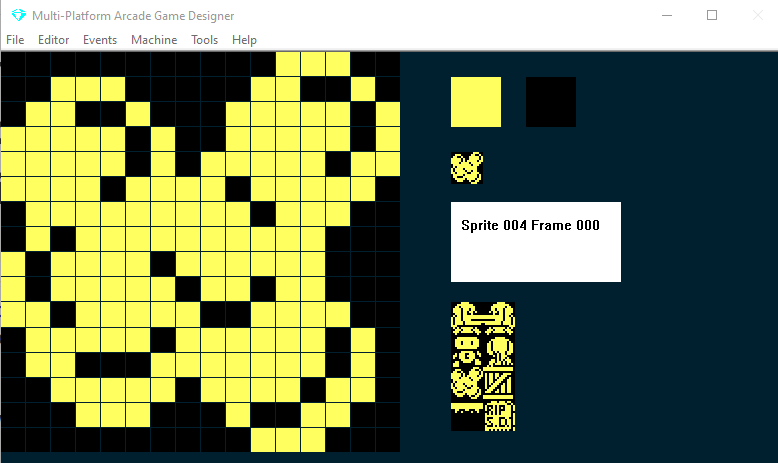
Primeiro, vamos criar um sprite novo de peido (ninguém disse que este ia ser um jogo de grande nível). Isto serve:
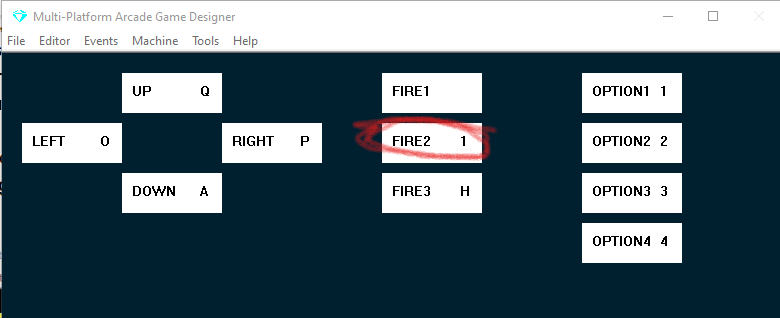
Agora vamos precisar de um novo teste de tecla no nosso evento Player para, bem, soltar um peido... vamos usar a tecla 1 e associá-la a FIRE2: no menu Editor seleciona Keyboard Controls, clica na caixa FIRE2 e carrega na tua tecla 1:
Em seguida vamos abrir o nosso PLAYER EVENT e adicionar algum código para libertar o peido...coloca-o por baixo da instrução IF que controla o SALTO (por baixo do seu ENDIF)
IF KEY FIRE2              ; is the FIRE2 key being pressed?
   SPAWN 2 4              ; SPAWN a fart (TYPE 2, IMAGE 4)
ENDIF
O SPAWN tem dois argumentos: o primeiro determina o TYPE (que depois podemos programar no evento 'Sprite Type 2') e a IMAGE do sprite que será gerado (no meu exemplo a imagem é a número 4; obviamente podes alterá-los consoante o teu jogo).
Vamos testar o jogo para ver o que acontece.
Pois, como seria de esperar, não correu bem.
Há aqui várias lições.
Quando o nosso sprite do jogador gera (SPAWN) outro sprite, o novo sprite aparece na mesma posição X e Y que o jogador
Se mantiveres o dedo no botão FIRE2, vai continuar a gerar sprites novos. E o MPAGD só consegue lidar com 12 sprites no ecrã ao mesmo tempo.
Portanto, vamos ter de estabelecer alguns controlos:
Vamos limitar o Stinky Dog a ter um único peido ativo de cada vez
Precisamos que o peido saia do seu traseiro!
Primeiro, vamos criar uma variável nova, F, que vai registar se há ou não um peido 'em jogo'; vamos pô-la a 0 (nenhum peido em jogo) no nosso evento RESTARTSCREEN com um simples:
LET F = 0 ; when we start a screen, there is no fart in play
Depois, no evento do jogador vamos alargar o nosso código FIRE2 para que só gere um peido quando F for 0
IF KEY FIRE2              ; is the FIRE2 key being pressed?
   IF F = 0               ; if there is no fart in play
      SPAWN 2 4           ; SPAWN a fart (TYPE 2, IMAGE 4)
      LET F = 1           ; there is now a fart in play
   ENDIF
ENDIF
Assim, agora, ao testar o jogo, o Stinky Dog vai soltar um único peido, porque pomos F a 1 imediatamente depois do SPAWN para evitar outra ronda de flatulência.
Mas continua a aparecer mesmo em cima do Stinky Dog.
Agora, lembra-te de que quando editámos o script do jogador na Parte 14 adicionámos uma linha de código nas cláusulas de ir para a esquerda e para a direita:
LET DIRECTION = LEFT
LET DIRECTION = RIGHT
Fizemo-lo para nos lembrarmos para que lado o Stinky Dog está virado e a deslocar-se.
Por isso podemos usá-lo para reposicionar o peido. Vamos melhorar mais um pouco o nosso código FIRE2:
IF KEY FIRE2                    ; is the FIRE2 key being pressed?
   IF F = 0                     ; if there is no fart in play
      IF DIRECTION = LEFT       ; if Stinky Dog is facing Left
         ADD 16 TO X            ; set X 16 pixels to the right
         SPAWN 2 4              ; SPAWN a fart (TYPE 2, IMAGE 4)
         SUBTRACT 16 FROM X     ; reset X to its original position
         LET F = 1              ; there is now a fart in play
      ELSE
         IF DIRECTION = RIGHT   ; if Stinky Dog is facing Right
            SUBTRACT 16 FROM X  ; set X 16 pixels to the left
            SPAWN 2 4           ; SPAWN a fart (TYPE 2, IMAGE 4)
            ADD 16 TO X         ; reset X to its original position
            LET F = 1           ; there is now a fart in play
         ENDIF
      ENDIF
   ENDIF
ENDIF
Como o programa percorre sequencialmente cada evento, conseguimos manipular o valor X do Stinky Dog, gerar o peido e repor o valor X para que o próprio Stinky Dog não se mova.
Testa o teu jogo outra vez, com sorte vai acontecer isto...
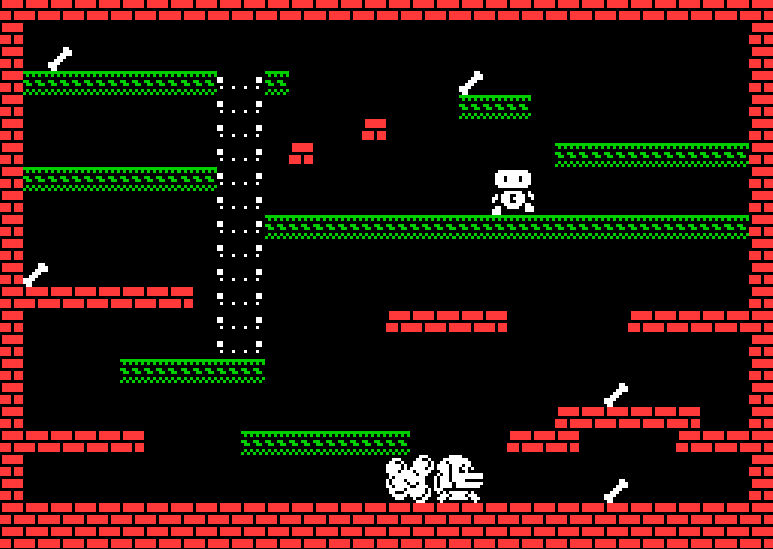
Um peido é libertado do traseiro do Stinky Dog. Mas fica ali parado. A não fazer nada. Vamos ao nosso SPRITE TYPE 2 EVENT.
Quero que funcione assim:
O Stinky Dog solta um peido
O peido fica por ali um bocado
O peido sobe pelo ecrã
Se o peido atingir o nosso inimigo, o Sideways Clive, este fica KO durante um bocado e deixa de se mover
Até agora conseguimos a parte 1, vamos ver as partes 2 e 3.
Vamos precisar de um temporizador que conte, digamos, 1 segundo. Este temporizador vai ser local ao peido, por isso podemos usar uma das variáveis específicas do sprite; vou usar SETTINGA.
Ora, o MPAGD corre a 25 fotogramas por segundo, por isso se incrementarmos o SettingA em 1, deve demorar cerca de 1 segundo a chegar a 25.
Quando chegar a 25 queremos que comece a subir pelo ecrã. Eis como podemos conseguir tudo isto:
IF SETTINGA < 25                    ; IF SETTINGA is less than 25
   ADD 1 TO SETTINGA                ; increment it
ELSE                                ; otherwise if it is 25
   SPRITEUP                         ; move the fart upwards
ENDIF
Vamos testá-lo:
Pronto, mais ou menos funciona: o peido continua a subir pelo ecrã, mas quando chega ao topo dá a volta e volta a aparecer em baixo.
Vamos adicionar mais algum código que remova o peido quando chegar ao topo, e permita ao Stinky Dog soltar outro!
Vamos adicioná-lo ao nosso evento SPRITE TYPE 2:
IF Y <= TOPEDGE             ; if the fart reaches the top of the play area
   REMOVE                   ; remove the fart
   LET F = 0                ; reset F to No Fart in Play
ENDIF
Lembra-te de que, ao contrário de um gráfico, o eixo Y do Spectrum tem o 0 no topo, não em baixo. Assim, quando o Y do peido chegar a TOPEDGE, vamos fazer REMOVE do sprite e repor a 0 a nossa variável de peido em jogo (F), o que significa que já não há nenhum no ecrã.
Muito bem, agora que escrevemos o código do peido, temos de nos ocupar do que acontece quando ele atinge o Sideways Clive. Queremos deixá-lo KO durante algum tempo e fazer com que pare de se mover.
Vamos ver o código do Sideways Clive que deixámos o MPAGD gerar por nós na Parte 10 , adicionei-lhe comentários para te ajudar a perceber cada linha:
IF DIRECTION = LEFT                 ; if direction is set to left
    IF CANGOLEFT                    ; and there is nothing in the way
        SPRITELEFT                  ; move sideways clive left
        SUBTRACT 16 FROM X          ; check 16 pixels to the left of clive
        IF CANGODOWN                ; would he be able to go down there?
            LET DIRECTION = RIGHT   ; if so change direction to RIGHT
            LET IMAGE = 2           ; make sure we are on image 2
            LET FRAME = 0           ; and make sure its the first frame
        ENDIF
        ADD 16 TO X                 ; reset x to its original value
    ELSE                            ; if he cant go left
        LET DIRECTION = RIGHT       ; change direction to right
        LET IMAGE = 2               ; make sure we are on image 2
        LET FRAME = 0               ; and make sure its the first frame
    ENDIF
ELSE                            ; if DIRECTION isnt left, it must be RIGHT
    IF CANGORIGHT               ; if clive can go right (
        SPRITERIGHT              ; go right
        ADD 16 TO X               ; check 16 pixels to the right of clive
        IF CANGODOWN              ; if he was there, would he fall down?
            LET DIRECTION = LEFT  ; if so, change direction to left
            LET IMAGE = 2         ; make sure we are on image 2
            LET FRAME = 0         ; and make sure its the first frame
        ENDIF
        SUBTRACT 16 FROM X        ; reset X to its original value
    ELSE                          ; if he can't go right
        LET DIRECTION = LEFT      ; change direction to left
        LET IMAGE = 2             ; make sure we are on image 2
        LET FRAME = 0             ; and make sure its the first frame
    ENDIF
ENDIF

ANIMATE                      ; cycle through Clives frames to animate him

IF COLLISION PLAYER          ; if Clive touches Stinky Dog
    KILL                     ; Kill Stinky Dog
ENDIF
Ora, espero que repares que há ali muita repetição de que na verdade não precisamos. E aconselho-te a tentares sempre ser o mais económico possível com o teu código. O código acima assume que tens imagens diferentes para virado à esquerda e virado à direita (como o Stinky Dog), mas o Sideways Clive está sempre virado para a frente ...e arrasta-se de lado, da esquerda para a direita. Por isso podemos retirar logo todas essas linhas LET IMAGE = 2, LET FRAME = 0 e poupar alguns bytes:
IF DIRECTION = LEFT                 ; if direction is set to left
    IF CANGOLEFT                    ; and there is nothing in the way
        SPRITELEFT                  ; move sideways Clive left
        SUBTRACT 16 FROM X          ; check 16 pixels to the left of Clive
        IF CANGODOWN                ; would he be able to go down there?
            LET DIRECTION = RIGHT   ; if so change direction to RIGHT
        ENDIF
        ADD 16 TO X                 ; reset x to its original value
    ELSE                            ; if he cant go left
        LET DIRECTION = RIGHT       ; change direction to right
    ENDIF
ELSE                           ; if DIRECTION isn't left, it must be RIGHT
    IF CANGORIGHT               ; if Clive can go right (
        SPRITERIGHT             ; go right
        ADD 16 TO X               ; check 16 pixels to the right of Clive
        IF CANGODOWN              ; if he was there, would he fall down?
            LET DIRECTION = LEFT  ; if so, change direction to left
        ENDIF
        SUBTRACT 16 FROM X        ; reset X to its original value
    ELSE                          ; if he can't go right
        LET DIRECTION = LEFT      ; change direction to left
    ENDIF
ENDIF

ANIMATE                      ; cycle through Clive's frames to animate him

IF COLLISION PLAYER          ; if Clive touches Stinky Dog
    KILL                     ; Kill Stinky Dog
ENDIF
Ou seja, tal como está agora, se DIRECTION for LEFT o Clive vai para a esquerda e se DIRECTION for RIGHT vai para a direita.
Vamos criar uma nova direção, chamada STUNNED
Se o Clive estiver STUNNED, não se vai mexer de todo.
Primeiro, vamos adicionar código de colisão:
IF COLLISION 2             ; if Clive touches a Type 2 sprite (the fart)
   IF DIRECTION = LEFT     ; if Clive is going left
      LET SETTINGB = 0     ; remember the direction he was going, 0 = Left
   ELSE                    ; if he wasn't going left
      LET SETTINGB = 1     ; he was going RIGHT, 1 = RIGHT
   ENDIF
   LET DIRECTION = 5       ; set the direction to STUNNED
   LET SETTINGA = 0        ; start the stunned timer
   OTHER                   ; switch to the Fart
   REMOVE                  ; remove the fart
   ENDSPRITE               ; switch back to this event
   LET F = 0               ; reset the Fart in play to no fart in play
ENDIF
Há duas coisas a notar aqui. Primeiro, não podemos usar uma etiqueta qualquer para DIRECTION: LEFT, RIGHT, UP & DOWN são permitidas, mas não podemos usar STUNNED, por isso vamos usar o valor 5 para indicar quando o Clive está atordoado.
Segundo, introduzimos o comando OTHER, que permite mudar para o outro sprite envolvido na colisão, neste caso o peido, e executar alguma ação sobre ele, no nosso caso fazer REMOVE. O comando ENDSPRITE diz ao MPAGD para voltar a este evento. Usa o OTHER com cuidado: pode abrandar o jogo se fizeres demasiado com ele, e termina-o sempre com ENDSPRITE.
Agora vamos adaptar o nosso código de movimento para permitir o atordoamento ...
IF DIRECTION = LEFT              ; if direction is set to left
   SPRITEINK 71
   IF CANGOLEFT                  ; and there is nothing in the way
      SPRITELEFT                 ; move sideways Clive left
      SUBTRACT 16 FROM X         ; check 16 pixels to the left of Clive
      IF CANGODOWN               ; would he be able to go down there?
         LET DIRECTION = RIGHT   ; if so change direction to RIGHT
      ENDIF
         ADD 16 TO X             ; reset x to its original value
   ELSE                          ; if he cant go left
      LET DIRECTION = RIGHT      ; change direction to right
   ENDIF
ELSE                             ; if DIRECTION isn't left
   IF DIRECTION = RIGHT          ; is it RIGHT, if so...
      SPRITEINK 71
      IF CANGORIGHT              ; if Clive can go right (
         SPRITERIGHT             ; go right
         ADD 16 TO X             ; check 16 pixels to the right of Clive
         IF CANGODOWN            ; if he was there, would he fall down?
            LET DIRECTION = LEFT ; if so, change direction to left
         ENDIF
         SUBTRACT 16 FROM X      ; reset X to its original value
      ELSE                       ; if he cant go right any more
         LET DIRECTION = LEFT    ; change direction to left
      ENDIF
   ELSE
      IF DIRECTION = 5           ; if clive is stunned
	     SPRITEINK 67        ; change him to magenta
         ADD 1 TO SETTINGA       ; increment the stun timer
         IF SETTINGA = 100       ; when timer reaches 100
            IF SETTINGB = 0      ; if previously he was going left
               LET DIRECTION = LEFT   ; go left
            ELSE                      ; otherwise
               LET DIRECTION = RIGHT  ; go right
            ENDIF
         ENDIF
      ENDIF
   ENDIF
ENDIF
Como podes ver, alarguei a cláusula principal IF...ELSE...ENDIF para tratar do que deve acontecer quando DIRECTION = 5 (ou seja, quando o Clive está atordoado): mudamo-lo de branco para magenta e incrementamos um temporizador de 4 segundos, no fim do qual ele continuará na sua direção de deslocação anterior.
Por fim, para arrematar, agora que no código conseguimos saber, a qualquer momento, se o Clive está atordoado ou não, vamos mudar o código da colisão com o jogador (Stinky Dog) para que o Clive não possa matar o Stinky Dog se estiver atordoado. Conseguimos isso simplesmente mudando-o para:
IF COLLISION PLAYER        ; if Clive touches Stinky Dog
   IF DIRECTION <> 5       ; and if Clive is not stunned
      KILL                 ; Kill Stinky Dog
   ENDIF
ENDIF
Ok, vamos experimentar...
Sou só eu, ou temos aqui o início de algo que não é totalmente uma porcaria?!
Reconheço que este foi um tutorial longo, por isso, como referência, aqui estão os eventos completos com que temos estado a trabalhar, para os comparares com os teus:
EVENT PLAYER
;===============STINKY DOG=================
IF KEY LEFT                    ; Is the left key pressed?
    LET DIRECTION = LEFT       ; if so, remember I am going LEFT
    LET IMAGE = 1              ; display the left facing image
    IF X <= LEFTEDGE           ; are we at the left edge of the screen?
        SCREENLEFT             ; if so, go to the screen to left on the map
        LET X = RIGHTEDGE      ; and put me at the right edge of that screen
        EXIT                   ; and stop processing this event
    ELSE                       ; if I'm not at the left edge
        IF CANGOLEFT           ; is there space to the left of me?
            SPRITELEFT         ; if so move me left
            ANIMATE            ; and animate me
        ENDIF
    ENDIF
ENDIF

IF KEY RIGHT                   ; Is the right key pressed?
    LET DIRECTION = RIGHT      ; if so, remember I am going RIGHT
    LET IMAGE = 0              ; display the right facing image
    IF X >= RIGHTEDGE          ; Am I at the right edge of the screen?
        SCREENRIGHT            ; if so go to the screen to right on the map
        LET X = LEFTEDGE       ; and put me at the left edge
        EXIT                   ; and stop processing this event
    ELSE                       ; if I'm not at the right edge
        IF CANGORIGHT          ; is there space to the right of me?
            SPRITERIGHT        ; if so, move me right
            ANIMATE            ; and animate me?
        ENDIF
    ENDIF
ENDIF

IF KEY UP                      ; is the UP key pressed?
   ANIMATE SLOW                ; if so, animate me slowly
   IF LADDERABOVE              ; is there a ladder above me?
      IF CANGOUP               ; can I go up?
         LET IMAGE = 3         ; display the image of me climbing
    	 SPRITEUP              ; move me up
         LET DIRECTION = UP    ; remember I am going up
      ELSE                     ; if there is a ladder above me, but I cant go up
         ADD 1 TO Y            ; nudge me 1 pixel to the right
      ENDIF
   ELSE                        ; if there isn't a ladder above me
      SPRITELEFT               ; move me left
      IF LADDERABOVE           ; now is there a ladder above me?
      ELSE                     ; if not
         SPRITERIGHT           ; move me back where I was
         SPRITERIGHT           ; then a bit more to the right
         IF LADDERABOVE        ; now is there a ladder above me?
      	 ELSE                  ; if not
            SPRITELEFT         ; move me back where I was
         ENDIF
      ENDIF
   ENDIF
ENDIF


IF KEY DOWN                    ; is the DOWN key pressed?
   ANIMATE SLOW                ; if so, animate me slowly
   IF LADDERBELOW              ; is there a ladder below me?
      LET IMAGE = 3            ; if so, set my image to the climbing one
      SPRITEDOWN               ; move me down
      LET DIRECTION = DOWN     ; remember I am going down
   ELSE                        ; if there isn't a ladder below me
      SPRITELEFT               ; move me left
      IF LADDERBELOW           ; is there a ladder below me now?
      ELSE                     ; if not
         SPRITERIGHT           ; move me back where I was
         SPRITERIGHT           ; then a bit more to the right
         IF LADDERBELOW        ; now is there a ladder below me?
         ELSE                  ; if not
            SPRITELEFT         ; move me back where I was
         ENDIF
      ENDIF
   ENDIF
ENDIF


IF KEY FIRE                    ; is the Fire key being pressed?
    JUMP 7                     ; if so, make me Jump to height 7
ENDIF

IF KEY FIRE2                    ; is the FIRE2 key being pressed?
   IF F = 0                     ; if there is no fart in play
      IF DIRECTION = LEFT       ; if Stinky Dog is facing Left
         ADD 16 TO X            ; set X 16 pixels to the right
         SPAWN 2 4              ; SPAWN a fart (TYPE 2, IMAGE 4)
         SUBTRACT 16 FROM X     ; reset X to its original position
         LET F = 1              ; there is now a fart in play
      ELSE
         IF DIRECTION = RIGHT   ; if Stinky Dog is facing Right
            SUBTRACT 16 FROM X  ; set X 16 pixels to the left
            SPAWN 2 4           ; SPAWN a fart (TYPE 2, IMAGE 4)
            ADD 16 TO X         ; reset X to its original position
            LET F = 1           ; there is now a fart in play
         ENDIF
      ENDIF
   ENDIF
ENDIF


FALL                           ; make me fall if there is nothing below me

IF DEADLY                      ; am I touching something deadly?
    KILL                       ; if so, kill me
ENDIF

GETBLOCKS                      ; if I touch any collectible blocks, run the Collected Block script
EVENT SPRITETYPE1
;============SIDEWAYS CLIVE==================================
IF DIRECTION = LEFT ; if direction is set to left
SPRITEINK 71 ; BRIGHT WHITE
IF CANGOLEFT ; and there is nothing in the way
SPRITELEFT ; move sideways Clive left
SUBTRACT 16 FROM X ; check 16 pixels to the left of Clive
IF CANGODOWN ; would he be able to go down there?
LET DIRECTION = RIGHT ; if so change direction to RIGHT
ENDIF
ADD 16 TO X ; reset x to its original value
ELSE ; if he cant go left
LET DIRECTION = RIGHT ; change direction to right
ENDIF
ELSE ; if DIRECTION isn't left
IF DIRECTION = RIGHT ; is it RIGHT, if so...
SPRITEINK 71 ; BRIGHT WHITE
IF CANGORIGHT ; if Clive can go right (
SPRITERIGHT ; go right
ADD 16 TO X ; check 16 pixels to the right of Clive
IF CANGODOWN ; if he was there, would he fall down?
LET DIRECTION = LEFT ; if so, change direction to left
ENDIF
SUBTRACT 16 FROM X ; reset X to its original value
ELSE ; if he cant go right any more
LET DIRECTION = LEFT ; change direction to left
ENDIF
ELSE
IF DIRECTION = 5 ; if clive is stunned
SPRITEINK 67 ; change him to magenta
ADD 1 TO SETTINGA ; increment the stun timer
IF SETTINGA = 100 ; when timer reaches 100
IF SETTINGB = 0 ; if previously he was going left
LET DIRECTION = LEFT ; go left
ELSE ; otherwitse
LET DIRECTION = RIGHT ; go right
ENDIF
ENDIF
ENDIF
ENDIF
ENDIF
ANIMATE ; cycle through Clives frames to animate him
IF COLLISION PLAYER ; if Clive touches Stinky Dog
IF DIRECTION <> 5 ; and if Clive is not stunned
KILL ; Kill Stinky Dog
ENDIF
ENDIF
IF COLLISION 2 ; if Clive touches a Type 2 sprite (the fart)
IF DIRECTION = LEFT ; if Clive is going left
LET SETTINGB = 0 ; remember the direction he was going, 0 = Left
ELSE ; if he wasn't going left
LET SETTINGB = 1 ; he was going RIGHT, 1 = RIGHT
ENDIF
LET DIRECTION = 5 ; set the direction to STUNNED
LET SETTINGA = 0 ; start the stunned timer
OTHER ; switch to the Fart
REMOVE ; remove the fart
ENDSPRITE ; switch back to this event
LET F = 0 ; reset the Fart in play to no fart in play
ENDIFEVENT SPRITETYPE2 ;============FART================================== IF SETTINGA < 25 ADD 1 TO SETTINGA ELSE SPRITEUP ENDIF IF Y <= TOPEDGE ; if the fart reaches the top of the play area REMOVE ; remove the fart LET F = 0 ; reset F to No Fart in Play ENDIF