
Volvamos al BLOCK EDITOR y echemos un vistazo a uno de los otros BLOCKTYPES que podemos usar en nuestros juegos de MPAGD. Hasta ahora hemos visto:
WALLBLOCKS: bloques sólidos que el jugador no puede atravesar pero sobre los que puede caminar
PLATFORMBLOCKS: que el jugador puede atravesar y sobre los que puede caminar
LADDERBLOCKS: por los que el jugador puede subir y bajar y que puede cruzar
EMPTYBLOCKS: que el jugador puede atravesar
El siguiente que veremos son los FODDERBLOCKS. Abre tu BLOCK EDITOR, pulsa X para crear un bloque nuevo y cambia su BLOCK TYPE a FODDER
Voy a crear algo de tierra azul...
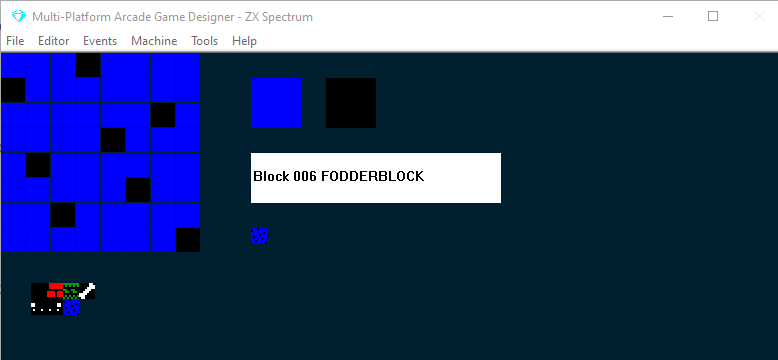
A continuación abre tu SCREEN EDITOR y añade una zona de FODDERBLOCKS
Ahora probemos el juego
Como ves, los FODDERBLOCKS se comportan por defecto como WALLBLOCKS: Stinky Dog no puede atravesarlos pero sí caminar sobre ellos. Entonces, ¿cómo va a llegar a ese hueso enterrado?
Entonces, ¿cuál es la gracia de los FODDERBLOCKS? Pues bien, la gran diferencia entre los bloques FODDER & WALL es que los FODDERBLOCKS se pueden eliminar con el comando DIG.
Vamos a darle a Stinky Dog la capacidad de cavar a través de los fodderblocks; para ello solo tenemos que añadir unas pocas líneas de código al PLAYER EVENT
Tenemos que encontrar las dos sentencias que controlan el movimiento de Stinky Dog a la izquierda y a la derecha y añadir el código que he resaltado a continuación:
IF KEY LEFT                  ; Is the left key pressed?
    LET DIRECTION = LEFT     ; if so, remember I am going LEFT
    LET IMAGE = 1            ; display the left facing image
    IF X <= LEFTEDGE         ; are we at the left edge of the screen?
        SCREENLEFT           ; if so, go to the screen to left on the map
        LET X = RIGHTEDGE    ; and put me at the right edge of that screen
        EXIT                 ; and stop processing this event
    ELSE                     ; if I'm not at the left edge
        IF CANGOLEFT         ; is there space to the left of me?
            SPRITELEFT       ; if so move me left
            ANIMATE          ; and animate me
	ELSE                 ; if I cant go left
	   DIG LEFT          ; remove any FODDER to my left
        ENDIF
    ENDIF
ENDIF

IF KEY RIGHT                 ; Is the right key pressed?
    LET DIRECTION = RIGHT    ; if so, remember I am going RIGHT
    LET IMAGE = 0            ; display the right facing image
    IF X >= RIGHTEDGE        ; Am I at the right edge of the screen?
        SCREENRIGHT          ; if so go to the screen to right on the map
        LET X = LEFTEDGE     ; and put me at the left edge
        EXIT                 ; and stop processing this event
    ELSE                     ; if I'm not at the right edge
        IF CANGORIGHT        ; is there space to the right of me?
           SPRITERIGHT       ; if so, move me right
           ANIMATE           ; and animate me?
	ELSE                 ; if I can't go right
	   DIG RIGHT         ; move any fodder to my right
        ENDIF
    ENDIF
ENDIF
Las funciones CANGOLEFT y CANGORIGHT comprueban si podemos movernos en esas direcciones, es decir, si hay WALLBLOCKS u otros bloques que no permiten el paso al jugador, que es lo normal en el caso de los FODDERBLOCKS.
Nuestro nuevo código eliminará (DIG) automáticamente cualquier fodderblock que se interponga (sin esto, los FODDERBLOCKS funcionarán igual que los WALLBLOCKS).
Vamos a probarlo...
Ahora Stinky Dog puede quitar la tierra para llegar al hueso enterrado.
DIG siempre necesita una dirección: aquí hemos usado LEFT y RIGHT, pero también puedes usar UP y DOWN si tu juego lo requiere.
Ten en cuenta que los FODDERBLOCKS que se han cavado se volverán a dibujar después de cualquier comando que fuerce un redibujado, como MENU o REDRAW, o si el jugador vuelve a entrar en una pantalla, o reaparece tras morir. Hay una forma de eliminar permanentemente el fodder cavado, pero requiere un pequeño cambio en el motor de MPAGD y que tu juego se ejecute en Adventure Mode... pero eso ya es algo más avanzado y un tema que abordaré otro día.