
Vamos voltar ao BLOCK EDITOR e dar uma vista de olhos a um dos outros BLOCKTYPES que podemos usar nos nossos jogos MPAGD. Até agora vimos:
WALLBLOCKS: blocos sólidos que o jogador não pode atravessar mas sobre os quais pode andar
PLATFORMBLOCKS: que o jogador pode atravessar e sobre os quais pode andar
LADDERBLOCKS: que o jogador pode subir, descer e atravessar
EMPTYBLOCKS: que o jogador pode atravessar
O próximo que vamos ver são os FODDERBLOCKS. Abre o teu BLOCK EDITOR, prime X para criar um novo bloco e muda o seu BLOCK TYPE para FODDER
Vou criar um pouco de terra azul...
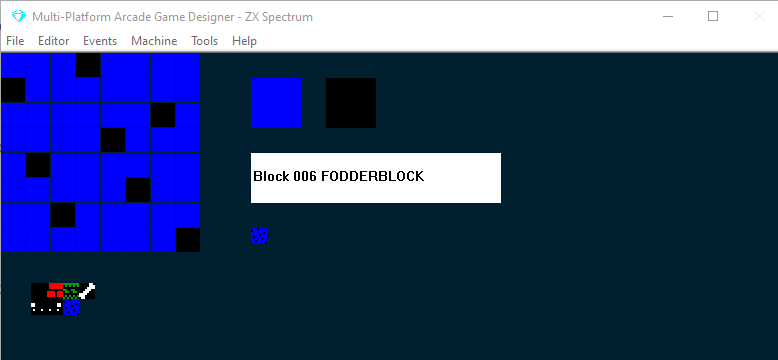
A seguir, abre o teu SCREEN EDITOR e adiciona uma área de FODDERBLOCKS
Agora vamos testar o jogo
Como vês, por predefinição os FODDERBLOCKS comportam-se como WALLBLOCKS: o Stinky Dog não os consegue atravessar mas pode andar por cima deles. Então, como é que ele vai chegar àquele osso enterrado?
Então, qual é a utilidade dos FODDERBLOCKS? Bem, a grande diferença entre os blocos FODDER & WALL é que os FODDERBLOCKS podem ser removidos com o comando DIG.
Vamos dar ao Stinky Dog a capacidade de escavar os fodderblocks; para isso, só temos de adicionar algumas linhas de código ao PLAYER EVENT
Precisamos de encontrar as duas instruções que controlam o movimento do Stinky Dog para a esquerda e para a direita e adicionar o código que destaquei abaixo:
IF KEY LEFT                  ; Is the left key pressed?
    LET DIRECTION = LEFT     ; if so, remember I am going LEFT
    LET IMAGE = 1            ; display the left facing image
    IF X <= LEFTEDGE         ; are we at the left edge of the screen?
        SCREENLEFT           ; if so, go to the screen to left on the map
        LET X = RIGHTEDGE    ; and put me at the right edge of that screen
        EXIT                 ; and stop processing this event
    ELSE                     ; if I'm not at the left edge
        IF CANGOLEFT         ; is there space to the left of me?
            SPRITELEFT       ; if so move me left
            ANIMATE          ; and animate me
	ELSE                 ; if I cant go left
	   DIG LEFT          ; remove any FODDER to my left
        ENDIF
    ENDIF
ENDIF

IF KEY RIGHT                 ; Is the right key pressed?
    LET DIRECTION = RIGHT    ; if so, remember I am going RIGHT
    LET IMAGE = 0            ; display the right facing image
    IF X >= RIGHTEDGE        ; Am I at the right edge of the screen?
        SCREENRIGHT          ; if so go to the screen to right on the map
        LET X = LEFTEDGE     ; and put me at the left edge
        EXIT                 ; and stop processing this event
    ELSE                     ; if I'm not at the right edge
        IF CANGORIGHT        ; is there space to the right of me?
           SPRITERIGHT       ; if so, move me right
           ANIMATE           ; and animate me?
	ELSE                 ; if I can't go right
	   DIG RIGHT         ; move any fodder to my right
        ENDIF
    ENDIF
ENDIF
As funções CANGOLEFT e CANGORIGHT verificam se nos podemos mover nessas direções, ou seja, se existem WALLBLOCKS ou outros blocos que não deixam o jogador passar, o que, por predefinição, é o caso dos FODDERBLOCKS.
O nosso novo código vai agora remover (DIG) automaticamente quaisquer fodderblocks que estejam no caminho (sem isto, os FODDERBLOCKS funcionam como WALLBLOCKS).
Vamos testar...
Agora o Stinky Dog consegue remover a terra para chegar ao osso enterrado.
O DIG exige sempre uma direção: aqui usámos LEFT e RIGHT, mas também podes usar UP e DOWN se o teu jogo precisar.
Nota que os FODDERBLOCKS que foram escavados serão redesenhados depois de qualquer comando que force um redesenho, como MENU ou REDRAW, ou se o jogador voltar a entrar num ecrã, ou for recolocado depois de uma morte. Existe uma forma de remover permanentemente o fodder escavado, mas exige uma pequena alteração ao motor do MPAGD e que o teu jogo funcione em Adventure Mode... mas isso já é um pouco mais avançado e um tema que vou abordar noutro dia!