
This is really starting to come together, we have an easily extensible framework for creating alien movement patterns, but they are a bit toothless at the moment as they cant fire weapons of their own, so let's remedy that!
First we'll design an Alien Missile Sprite:
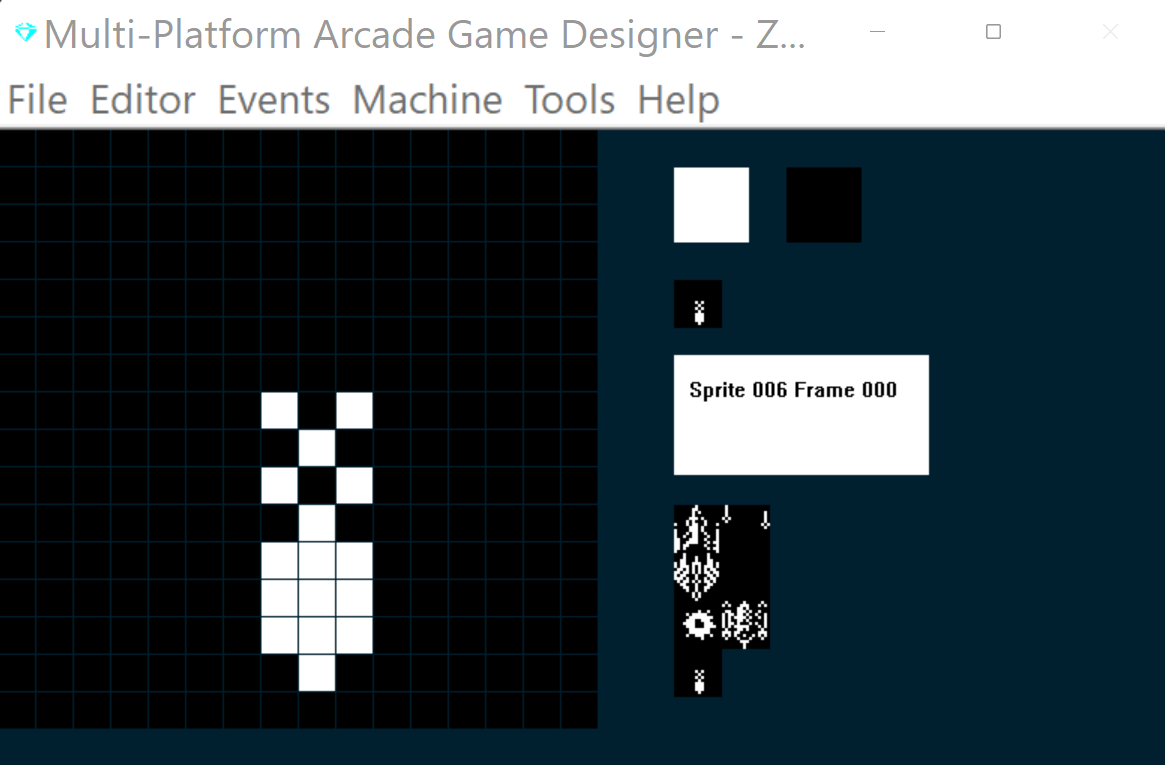
I'm going to use Sprite Type 3 for the Alien Missiles, but before we start coding there's something we're going to need to consider. And that's MPAGD's collision detection - since all sprites are 16 px x 16px - but our Alien Missile only occupies 3pixels wide - this might lead to some pretty mean collisions which visually dpnt appear to be a missile colliding with the player's spaceship - but will be registered by the engine as a collision, so we'll need to include some code that will help check whether the graphical part of the sprite has actually collided with the spaceship.
Also, we need to consider how the missiles travel, do they just go straight down?, should they home in on the player? or should they veer to the left or right dependent on the Alien's direction of travel when they launched the missile.
This latter approach is my favourite, and, since all of the Alien Directions are stored in the DIRECTION variable, it should be pretty easy to code the direction of the missile, so if an alien is travelling right when they released the missile then the missile should veer to the right, and so on.
Other things we need to consider include:
When should a missile be fired?
What is the probability of a missile being fired?
Should all Aliens fire at the same rate?
Should all Aliens fire missiles or only some?
How high up the screen should an alien be before they are allowed to fire missiles? (we might want to avoid them firing if they are just a few pixels above the player as that would be unfair.
We've built quite a flexible framework so far - so I'm thinking we could extend the flexibility further to allow us to vary the missile firing capabilities of each alien attack wave, that will help us make the attack waves progressively harder.
OK, so, on with the coding, first, lets extend our Spawner code to include some new variables for controlling the Aliens weapon firing capabilities, open up your Spawner event (Sprite Type 7, and add the highlighted code:
EVENT SPRITETYPE7

								; SPAWNER
								; ============


IF SETTINGA = 0				; first time we run this
	LET JUMPSPEED = 0			; reset the enemies spawned counter
	LET SETTINGB = 0			; reset the timer
	RESTORE					; start from the beginning of the data table
	REPEAT L					; get the data for this level
	READ AIRBORNE				; get the spawner movement
	READ X					; get starting x position
	READ Y					; get starting y position
	READ J					; get the enemy sprite type
	READ K					; get the enemy image
	READ E					; how many enemies in this level?
	READ G					; delay between releasing each enemy
	READ P					; points for a kill
	READ C					; colour
	READ W					; weapon
	READ H					; fire weapon probability
	READ Q					; min height to release weapons
	ENDREPEAT
	LET D = E				; how many kills to get bonus?
	LET F = E				; enemies remaining
	ADD 1 TO SETTINGA			; prevent this running again
ENDIF


IF SETTINGB = G				; has timer reached the delay point?
	IF JUMPSPEED < E			; are there still enemies left to spawn?
		IF S < 9		; are there 8 or less enemies already on screen?
			SPAWN J K			; spawn an enemy
			ADD 1 TO JUMPSPEED	; increment the number spawned
			SPAWNED				; switch to the enemy sprite
			LET DIRECTION = 0		; set its initial direction to 0
			ENDSPRITE			; retrun to the spawner
		ENDIF
	ELSE					; all enemies in this level have been spawned
		IF F = 0				; all enemies are off screen
		ADD 1 TO L			; get ready for next level
		IF L = 7				; have we reached the end of the levels?
			LET L = 1		; yes, start again
		ENDIF
		LET SETTINGA = 0		; get data for next level
		ENDIF
	ENDIF
	LET SETTINGB = 0			; reset the timer
ENDIF

ADD 1 TO SETTINGB				; increment the timer


DATA 0 132 8 5 2 8 8 5 67 1 10 100
DATA 0 100 8 5 2 8 8 10 68 1 10 100
DATA 0 232 16 5 5 8 6 15 69 1 8 100
DATA 0 8 16 5 5 8 6 15 70 1 8 100
DATA 0 232 146 5 2 16 6 20 71 1 4 100
DATA 0 8 146 5 2 16 6 20 66 1 4 100
All we've added here is three new variables that we will read in from the data table:
W (Weapon) - 0 will mean they can't fire missiles, 1 means they can
H(Probability of firing a weapon) the higher the value the less chance they will actually fire a missile
Q (firing height) this is the Y value below which (i.e. higher up the screen since Spectrum Y co-ordinates start at the top of the screen ) an alien must be if they are allowed to fire missiles..
I've added in some values for each of the 6 currently defined attack waves in the Data table at the bottom.
Next, we're going to need to add a couple of lines of code to our player event that will Store the players X & Y coordinate values as we're going to need to use these in the Aliens event to calculate how far, horizontally, the alien is from the player, open up your player event and add these lines at the bottom of your script:
LET M = X			; store player X in M
LET N = Y			; store player Y in N
Next, we'll add some code to the Alien event (Sprite Type 5), open yours up and add/update the highlighted code:
EVENT SPRITETYPE5


							; FLEXI ALIENS
							; =====================

SPRITEINK C					; colour the alien with C value

IF SETTINGA = 0				; Alien first appears
	RESTORE					; Restore the data table
	LET RND = L				; Store the Level number in RND
	ADD 50 TO RND			; and increase it by 50
	WHILE DIRECTION <> RND  ; While DIRECTION doesnt = RND
	READ DIRECTION			; Read value from DATA table
	READ SETTINGB			; Also read second value
	ENDWHILE				; Keep going until we find the value in RND
	LET SETTINGA = 1		; When we find it change SA to 1
ENDIF

IF SETTINGA = 1				; Ready to get direction & reptitions
	READ DIRECTION    		; Read the next movement into DIRECTION
	READ SETTINGB     		; Read the repetitions into SettingB
	LET SETTINGA = 2		;
ENDIF


IF COLLISION 1            	; if hit by a torpedo
	OTHER					; switch to torpedo
	LET DIRECTION = 99		; run the explosion
	ENDSPRITE				; return to this Alien
	LET TYPE = 6			; Switch it to explosion type
	LET IMAGE = 4			; Explosion image
	LET FRAME = 0			; first frame
	LET DIRECTION = 0		; tell explosion its an alien exploding
ENDIF


IF COLLISION 0				; if enemy and player collide
	LET TYPE = 6				; switch it to the explosion type
	LET IMAGE = 4				; and the explosion image
	LET FRAME = 0				; reset it to first frame
	LET DIRECTION = 0			; this is an alen exploding
	OTHER
	LET DIRECTION = 99		; trigger the player explosion
	ENDSPRITE
ENDIF

IF DIRECTION = 0				; Move N
	SPRITEUP
	SPRITEUP
ENDIF

IF DIRECTION = 1				; Move NNE
	SPRITERIGHT
	SPRITEUP
	SPRITEUP
ENDIF

IF DIRECTION = 2				; Move NE
	SPRITERIGHT
	SPRITERIGHT
	SPRITEUP
	SPRITEUP
ENDIF

IF DIRECTION = 3				; Move ENE
	SPRITERIGHT
	SPRITERIGHT
	SPRITEUP
ENDIF

IF DIRECTION = 4				; Move E
	SPRITERIGHT
	SPRITERIGHT

ENDIF

IF DIRECTION = 5				; Move ESE
	SPRITERIGHT
	SPRITERIGHT
	SPRITEDOWN
ENDIF

IF DIRECTION = 6				; MOVE SE
	SPRITERIGHT
	SPRITERIGHT
	SPRITEDOWN
	SPRITEDOWN
ENDIF

IF DIRECTION = 7				; MOVE SSE
	SPRITEDOWN
	SPRITEDOWN
	SPRITERIGHT
ENDIF

IF DIRECTION = 8				; MOVE S
	SPRITEDOWN
	SPRITEDOWN
ENDIF

IF DIRECTION = 9				; MOVE SSW
	SPRITEDOWN
	SPRITEDOWN
	SPRITELEFT
ENDIF

IF DIRECTION = 10				; MOVE SW
	SPRITEDOWN
	SPRITEDOWN
	SPRITELEFT
	SPRITELEFT
ENDIF

IF DIRECTION = 11				; MOVE WSW
	SPRITEDOWN
	SPRITELEFT
	SPRITELEFT
ENDIF

IF DIRECTION = 12				; MOVE W
	SPRITELEFT
	SPRITELEFT
ENDIF

IF DIRECTION = 13				; MOVE WNW
	SPRITELEFT
	SPRITELEFT
	SPRITEUP
ENDIF

IF DIRECTION = 14				; MOVE NW
	SPRITELEFT
	SPRITELEFT
	SPRITEUP
	SPRITEUP
ENDIF

IF DIRECTION = 15				; MOVE NNW
	SPRITELEFT
	SPRITEUP
	SPRITEUP
ENDIF

							; BOUNDARY CHECKING
							; ===================
IF X <= LEFTEDGE				; if alien reaches the left edge
	REMOVE					; remove it
	SUBTRACT 1 FROM S			; decrement the sprite counter
	SUBTRACT 1 FROM F			; decrement the all aliens in wave counter
ENDIF

IF X >= RIGHTEDGE				; if alien reaches the right edge
	REMOVE					; remove it
	SUBTRACT 1 FROM S			; decrement the sprite counter
	SUBTRACT 1 FROM F			; decrement the all aliens in wave counter
ENDIF

IF Y >= BOTTOMEDGE			; if alien reaches the right edge
	REMOVE					; remove it
	SUBTRACT 1 FROM S			; decrement the sprite counter
	SUBTRACT 1 FROM F			; decrement the all aliens in wave counter
ENDIF
							; SHALL WE SHOOT A MISSILE?
							; ===========================
IF Y < Q			; is alien above minimum height for releasing missiles?
	IF W > 0					; yes, can alien release	missiles?
		IF X < M				; yes, is Alien to the right of player?
			SUBTRACT X FROM M	; how far to the right of player is alien?
			IF M <= 8			; 8 or less pixels?
				LET AIRBORNE = 1	; run the chance of firing routine
			ENDIF
			ADD X TO M			; reset M
		ELSE
			IF M < X				; is alien to the left of player?
				SUBTRACT M FROM X ; yes, how far to the left
				IF X < = 8		; 8 pixels or less?
					LET AIRBORNE = 1; yes, run the chance of firing routine
				ENDIF
				ADD M TO X		; reset X
			ELSE					; enemy must be directly above player
				LET AIRBORNE = 1	; run the chance of firing routine
			ENDIF
		ENDIF
	ENDIF
ENDIF

IF AIRBORNE = 1				; Chance of firing routine
	IF S < 9					; are there 8 or less sprites on screen?
		GETRANDOM H			; yes, get a random number from 0 to the aliens missile probability #
		IF RND = 1				; is it 1?
			LET RND = DIRECTION	; yes, store aliens direction in RND
			SPAWN 3 6			; spawn a missile
			SPAWNED				; switch to the spawned missile
			LET DIRECTION = RND 	; set its direction to RND
			ENDSPRITE			; switch back to this alien
		ENDIF
	ENDIF
	LET AIRBORNE = 0 				; end the chance of firing routine
ENDIF

SUBTRACT 1 FROM SETTINGB			; decrement the repetitions
IF SETTINGB = 0		; has alien moved all repetitions?
	LET SETTINGA = 1		; get the next direction & # of repetitions
ENDIF


DATA 51 0 8 20 7 8 6 8 5 8 4 16
DATA 52 0 8 20 9 8 10 8 11 8 12 16
DATA 53 0 12 48 11 2 10 2 9 2 8 2 7 2 6 2 5 2 4 40 5 2 6 2 7 2 8 2 9 2 10 40
DATA 54 0 4 48 5 2 6 2 7 2 8 2 9 2 10 2 11 2 12 40 11 2 10 2 9 2 8 2 7 2 6 40
DATA 55 0 13 26 14 4 15 4 0 4 1 4 2 4 3 4 4 4 5 4 6 4 7 4 8 4 9 4 10 40
DATA 56 0 3 26 1 4 0 4 15 4 14 4 13 4 12 4 11 4 10 4 9 4 8 4 7 4 6 40
Read through the comments in the highlighted code and hopefully you'll understand what we are doing:
Check to see if the ALien is with 8 pixels to the left and x pixels to the right of the player
if they are, theres a random chance that a missile will be fired (provided they are also above the minimum vertical distance as set in variable Q) AND if there arent already too many sprites on screen
The probability of a missile being fired is 1 in H (where H is defined in the attack wave data table in the spawner event.
And if all these tests are passed spawn a missle (type 3, Image 6)
Then set the DIRECTION value of the spawned missile to be the same as the DIRECTION the alien was travelling in when they fired the missile.
Now all we need to do is write the missile code, so open up Sprite Type 3 and paste in this:
EVENT SPRITETYPE3
							; ENEMY MISSILE

SPRITEINK 71				; bright white
SPRITEDOWN				; go down fast (3 times
SPRITEDOWN
SPRITEDOWN
IF DIRECTION = 0			; was alien going down when fired?
ELSE						; if so, do nothing
	IF DIRECTION < 8		; was alien going right?
		SPRITERIGHT		; make missile veer right
	ELSE
		IF DIRECTION = 8	; was alien going straight up?
		ELSE				; do nothing
		SPRITELEFT		; alien was going left, veer missile left
		ENDIF
	ENDIF
ENDIF


IF COLLISION PLAYER			; has missile collided with player?
	IF X > M					; is missile to the right of player?
		SUBTRACT M FROM X		; find out how far to the right
		IF RND <= 10			; 10 px or less? its a hit!
			OTHER			; switch to the player
			LET DIRECTION = 99 ; trigger the player explosion
			ENDSPRITE		; switch back to this event
		ENDIF
		ADD M TO X			; reset X


	ELSE							; not to the right
		IF X < M					; is missile to the left?
			SUBTRACT X FROM M		; yes, how far to left?
			IF M <= 8			; 8 or less pixels?
				OTHER			;switch to the player
				LET DIRECTION = 99 ; trigger the player explosion
				ENDSPRITE		; switch back to this event
			ENDIF
			ADD X TO M			; reset M
		ELSE						; must have been a direct hit
			OTHER				; switch to the player
			LET DIRECTION = 99	; trigger the player explosion
			ENDSPRITE			;switch back to this event
		ENDIF
	ENDIF
ENDIF

IF Y >= 188						; has missile reached bottom of the screen
	REMOVE						; remove it
	SUBTRACT 1 FROM S				; decrement the sprite counter
ENDIF
So, we check for collisions with the player and then calculate how much of a direct hit it is, effectively creating a quick hit box, you can adjust these values to suit your own game and graphics.
One final thing to update, notice when we register a hit on the player we send an instruction to the player sprite to set its direction to 99, so we'll need to add a clause to our player event as follows ,open up your player event and add:
IF DIRECTION = 99
	LET TYPE = 6				; switch it to the explosion type
	LET IMAGE = 4				; and the explosion image
	LET FRAME = 0				; reset it to first frame
	LET DIRECTION = 1			; this is the player exploding
ENDIF
I've done this to save memory, since there may be multiple places in the code where we explode the player (notice I replaced the type, image, frame & direction settings in the Alien/Player collision in the ALien event (sprite type 5) earlier. Every byte counts!
OK, that should be everything we need to give the Aliens their firepower...time for a test!
That looks OK to me for now, we can always refine it later as the game progresses.
Next we'll do a bit of housekeeping and tidy some stuff up.
NEXT: PART 10 - A SPOT OF HOUSEKEEPING