
Power Desk · Guided tour
The script editor
A code editor made for MPAGD, with a checker, find and replace and safe saving. Take a short tour of the screen.
Step 1 of 12
Your scripts, in one place
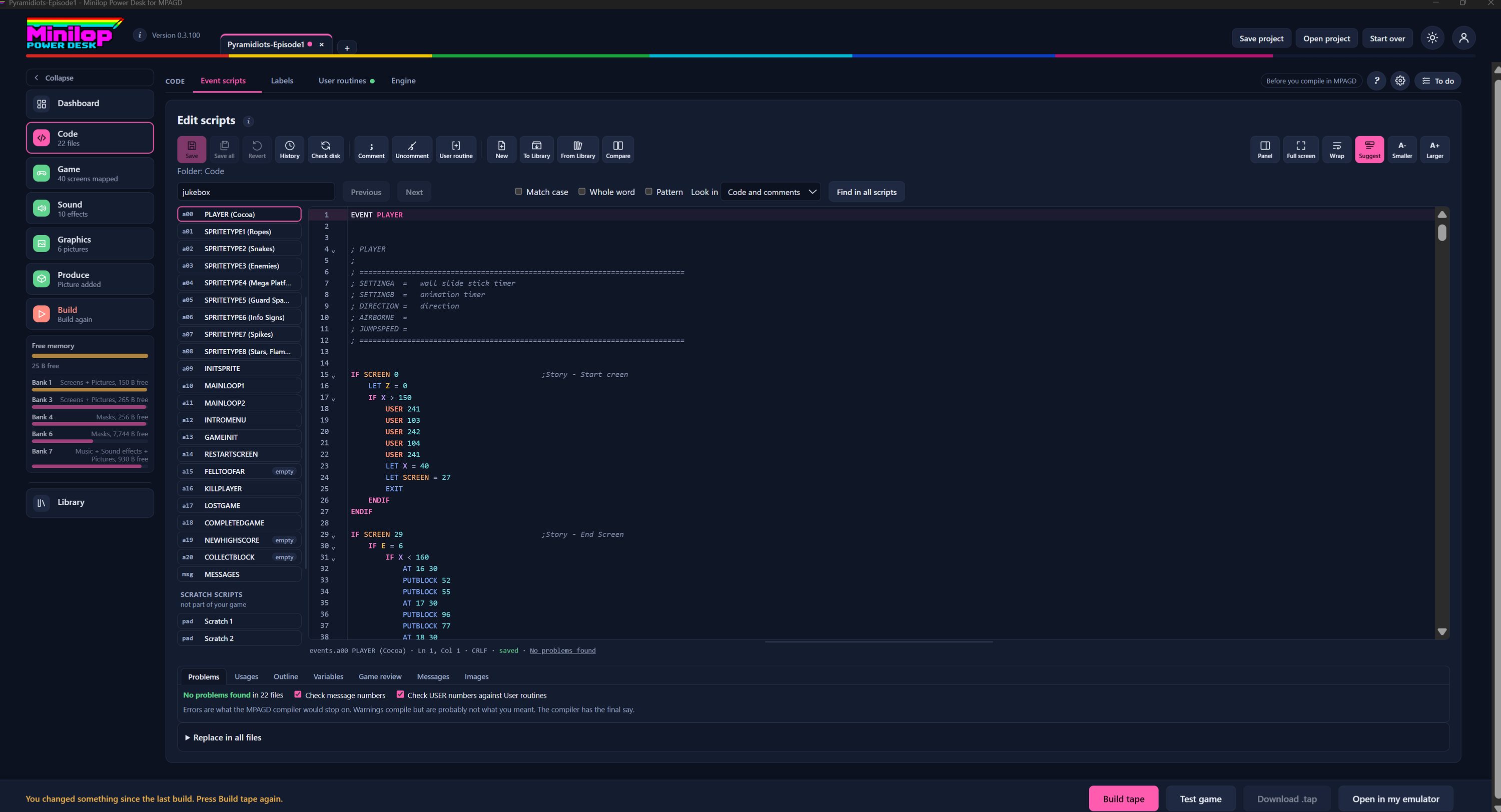
A code editor for events.a00 to events.a20 and events.msg, built for MPAGD. It does the job of Notepad or Notepad++ for these files, and it knows what the commands mean. Use Next, or the numbers, to walk round the screen.
Four tabs for your code
Code has four tabs: Event scripts, Labels, User routines and Engine. This tour is all about Event scripts.
Every script by name
The files are listed by event name, such as PLAYER and SPRITETYPE1, with a grey "empty" badge where an event has nothing in it. Scratch scripts sit underneath, kept apart from your game.
Careful saving
Save and Save all write only the files you changed, and every byte you did not change stays as it was. Revert undoes your edits to a file. History keeps the last 30 saves of each file, with a comparison and restore. Check disk notices if a file changed outside the Desk, for example in Notepad++.
Comments and user routines
Comment and Uncomment the selected lines (Ctrl+/ does the same). Insert user routine opens a list of the routines you chose, and puts the USER line in for you, indented to match.
Scratch scripts and the Library
New starts a scratch script for trying ideas, which is never part of your game. To Library keeps a whole script or just the lines you selected, and From Library adds one back. Compare shows the same script from two open projects side by side.
Find anything
A Find bar highlights every match and tells you, for example, 3 of 12. Match case, whole word and pattern are there, and you can look in code and comments, code only or comments only. Find in all scripts lists every match across every event file, and Replace in all files uses the same box and asks first.
An editor that reads MPAGD
Commands, tests, variables, numbers, strings and comments are coloured using the compiler's own word list, and a word the compiler would not recognise is underlined in red. IF, WHILE and REPEAT blocks fold from the arrows by the line numbers. Suggestions offer MPAGD commands as you type, and hovering over an image, block, screen, object or USER number shows what it refers to.
Mistakes caught as you type
Under the editor, the status line shows the file, the cursor position, whether it is saved and whether your blocks are balanced. The Problems tab lists every error and warning in all your files, and pressing one jumps to it. The checker follows the compiler's rules, and in testing it agreed with the real compiler on every error in 22 event files, 99 hand-made faults and 1,350 random damaged copies. The compiler still has the final say.
See where things are used
Beside Problems are Usages (every place a variable, USER number, message or command appears), Outline (the sections of the open file), Variables (how often each is set and read), Game review (checks across all scripts and the game file), Messages and Images.
Make the view your own
Move the checking panel beside the editor, go full screen, wrap long lines, switch command suggestions on or off, and make the text smaller or larger.
Then build the tape
When the scripts are right, build the tape, test it in the built-in emulator or open it in your own, all without leaving the Desk.
Next tour: User routine builder All tours